

Malaysia · LHDN MyInvois e-invoicing
E-invoice software in Malaysia: connecting your own ERP or billing system to MyInvois
On this page16 sections
In short: this guide is for businesses in Malaysia whose invoices come out of their own ERP, POS or billing system, which now has to send every e-invoice to LHDN (the Inland Revenue Board of Malaysia) for validation through the MyInvois API. It is not a review of off-the-shelf e-invoice software: if you only need a ready-made accounting package, one of the Malaysian vendors that sell MyInvois-ready software may suit you better, and we say below when that is the case. What follows is what your side of the integration has to do: who is in scope and from when, the RM3,000,000 exemption, portal or API, the submission flow, the UBL 2.1 format and its 55 fields, digital signing, the sandbox, limits and retries, the two 72-hour rules, and consolidated B2C e-invoices.
We build that integration for in-house and custom systems. We build your side of MyInvois; we hold no LHDN accreditation and are not on any LHDN list. We work with clients worldwide; calls and meetings can be arranged to suit you.
Every requirement below comes from LHDN's own documents and the official MyInvois SDK, re-checked on 13 November 2026 and listed under Sources. LHDN changed the exemption threshold in August 2026 and updates its guidelines often, so we name the document, version and date for each rule. This is not tax or legal advice.
Who must issue e-invoices in Malaysia, and from when
LHDN has phased e-invoicing in by annual turnover or revenue. Its implementation timeline page (updated 30 August 2026) sets four phases:
| Phase | Annual turnover or revenue | Implementation date |
|---|---|---|
| 1 | More than RM100 million | 1 August 2024 |
| 2 | More than RM25 million and up to RM100 million | 1 January 2025 |
| 3 | More than RM5 million and up to RM25 million | 1 July 2025 |
| 4 | Up to RM5 million (below RM3,000,000 is exempt) | 1 January 2026 |
How your phase is decided, per e-Invoice Guideline version 4.8 (section 1.5):
- From 2022 figures. Companies with audited accounts use the turnover or revenue in the financial year 2022 statements; others use the revenue in the year of assessment 2022 tax return. Once your date is set, later changes in turnover do not move it.
- New businesses. Businesses or operations that started in 2023 to 2025 with turnover or revenue of at least RM3,000,000 start on 1 July 2026. Those starting from 2026 start on 1 July 2026 or when operations begin; if first-year turnover is expected to be below RM3,000,000, the date is 1 January of the second year after the year turnover reaches RM3,000,000.
- No back-conversion. Invoices issued before your implementation date do not have to be turned into e-invoices.
- Early adoption is allowed. Any taxpayer may join voluntarily, whatever its turnover.
For a system owner, the date matters because everything after it (submission, validation, the 72-hour windows, consolidation) has to be working on day one, and testing in the sandbox takes time.
The exemption: RM3,000,000, and why you may still see RM1,000,000
Taxpayers with an annual turnover or revenue below RM3,000,000 are exempt from e-invoicing. This is the figure on LHDN's implementation timeline page (updated 30 August 2026) and in e-Invoice Guideline version 4.8 (published 30 August 2026, section 1.6.1(e)). You may still see RM1,000,000 in earlier LHDN material and on many other websites: LHDN's FAQ (updated 4 September 2026) describes the change as "the increase of the e-Invoice exemption threshold from RM1 million to RM3 million".
The exemption has exceptions. Section 1.6.10 of the guideline says it applies to all categories of taxpayer, but not to a taxpayer:
- with a non-individual shareholder (or equivalent) whose turnover or revenue is at least RM3,000,000;
- that is a subsidiary of a holding company with turnover or revenue of at least RM3,000,000; or
- with a related company or joint venture with turnover or revenue of at least RM3,000,000.
LHDN's FAQ adds that exempt taxpayers face no e-invoice compliance action or penalties, and encourages them to adopt e-invoicing voluntarily. Check the current guideline for your own situation: a small company inside a larger group is often not exempt.
The guideline also lists other exempt persons (for example foreign diplomatic offices and individuals not carrying on a business) and income that needs no e-invoice (such as employment income and pensions). Suppliers selling to an exempt person still issue e-invoices.
MyInvois Portal or API: which route fits your system
LHDN offers two ways to send e-invoices (Guideline version 4.8, Table 2.1): the MyInvois Portal, which LHDN describes as accessible to all taxpayers, and the API. The API in turn has three methods (section 2.4).
| Route | How invoices reach LHDN | Fits when |
|---|---|---|
| MyInvois Portal | Typed into a form, or uploaded in batches from a spreadsheet; you log in through MyTax | Low volume, or your system cannot be connected |
| API: direct ERP integration | Your own system signs and submits each document and stores the result | Invoices are generated by your system at volume and you control its code |
| API: Peppol service provider | Your system sends data to a provider on the Peppol network, which submits to MyInvois | You already exchange e-invoices over Peppol |
| API: non-Peppol technology provider | A middleware or software provider submits on your behalf as an intermediary | You prefer a service to building and running the connection |
LHDN's guideline puts it plainly: the API needs "upfront investment in technology and adjustments to existing systems", and the connection "may be made directly to IRBM or through intermediary technology providers". A rule of thumb that matches that table: if you issue a handful of invoices a day by hand, the portal is enough; if your ERP or billing system creates invoices automatically, typing them into a portal again does not scale, and an API route is the realistic one.
The SDK makes the same split at login. A taxpayer submitting its own documents uses Login as Taxpayer System; a service provider submitting for customers uses Login as Intermediary System with its own client ID and secret, and can only see the documents it submitted.
How the MyInvois API exchange works, step by step
The MyInvois SDK's integration practices page describes a polling pattern: submit, then ask for the result of the whole submission. For a direct integration, the flow looks like this.
- Build the document. Your system turns an invoice, note or self-billed document into UBL 2.1 JSON or XML with the required fields (next section).
- Sign it. The document is signed with your organisation's digital certificate (XAdES, SHA-256, RSA) for document version 1.1.
- Log in once and cache the token. Call Login as Taxpayer System with your client ID and secret. The token is valid for 60 minutes by default; reuse it for every call until it expires (a 401 means it has).
- Submit a batch.
POST /api/v1.0/documentsubmissions/with up to 100 documents, each with its format, the Base64 document, a SHA-256documentHashand your owncodeNumber. A successful call returns HTTP 202 with asubmissionUIDand lists of accepted and rejected documents. - Handle rejections at once. Documents rejected at submission (for example, an issuance date that is too old) go back to a fix list with the error.
- Poll Get Submission. Validation runs asynchronously; LHDN's FAQ says it is near real time, generally under two seconds. Use the submission UID to read every document's status, rather than checking documents one by one.
- Store the result. For each document, save its LHDN UUID, long ID and status against the invoice in your system: Submitted (1), Valid (2), Invalid (3) or Cancelled (4).
- Share it. Send the buyer the validated e-invoice or its visual representation with the QR code built from the validation link (see the QR section below).
- Watch the 72-hour window. For three days after validation the supplier can cancel and the buyer can request a rejection; your system needs both actions and the notifications that come with them.
The hosts differ between the sandbox and production. From the SDK FAQ:
                Portal                            API and identity service
Sandbox         preprod.myinvois.hasil.gov.my     preprod-api.myinvois.hasil.gov.my
Production      myinvois.hasil.gov.my             api.myinvois.hasil.gov.my

Submit documents:   POST {api host}/api/v1.0/documentsubmissions/    -> 202, submissionUID
Validation link:    {portal base URL}/{uuid}/share/{longid}
Document format: UBL 2.1, the 55 fields and the document types
MyInvois accepts documents in the structure of UBL 2.1 (Universal Business Language), written as either XML or JSON (Guideline version 4.8, section 2.4). There are 55 required data fields, grouped into eight categories: address, business details, contact number, invoice details, parties, party details, payment information, and products or services. Some cases need an annex.
There are eight document types, each with a code you submit:
| Code | Document | Code | Self-billed equivalent |
|---|---|---|---|
| 01 | Invoice | 11 | Self-billed invoice |
| 02 | Credit note | 12 | Self-billed credit note |
| 03 | Debit note | 13 | Self-billed debit note |
| 04 | Refund note | 14 | Self-billed refund note |
A credit, debit or refund note can point at several original e-invoices: the SDK FAQ says to add a new Billing Reference line for each original UUID.
Each type also has a version. Version 1.0 has the same structure as 1.1 but with signature validation switched off; the SDK says it will be deprecated and replaced by 1.1 at a date still to be announced. Version 1.1 validates the digital signature. Versions 1.2 and 1.3 exist only for the voluntary disclosure programme described below. A new integration should be built for 1.1.
Typical data gaps we see in in-house systems are the buyer's TIN and registration number, MSIC and classification codes, tax type codes, and state and country codes. LHDN provides a Validate Taxpayer's TIN API for checking buyer TINs before you submit; the SDK FAQ also explains the format rules, such as the IG prefix for individuals, removing leading zeros after the prefix, and the trailing zero on non-individual TINs.
Digital certificate and signature
For API submission, LHDN requires an organisation digital certificate (the SDK FAQ: "an organisation digital certificate is required"). It must be issued by a certificate authority licensed in Malaysia; the FAQ points to the list of licensees on the MCMC website. Both soft certificates (installed on a machine) and roaming certificates (held on a server) can be used.
The SDK's signature page sets the profile the certificate must have:
- an X.509 certificate with the organisation name (O), country (C = MY) and common name (CN);
- the organisation identifier (OID 2.5.4.97) holding your TIN, and the serial number (2.5.4.5) holding your business registration number (BRN);
- Key Usage including Non-Repudiation, and Enhanced Key Usage including Document Signing (1.3.6.1.4.1.311.10.3.12).
And the signature itself: XAdES enveloped in the UBL document, hashing with SHA-256, signing
with RSA, canonicalisation with xml-c14n11, and a signing timestamp in the signed properties.
The certificate expires, so renewal has to be in the plan; the FAQ says to check the expiry date with
your certificate authority.
If an intermediary submits for you, the certificate rules change: the SDK FAQ says a service provider can use its own certificate to submit for all its customers.
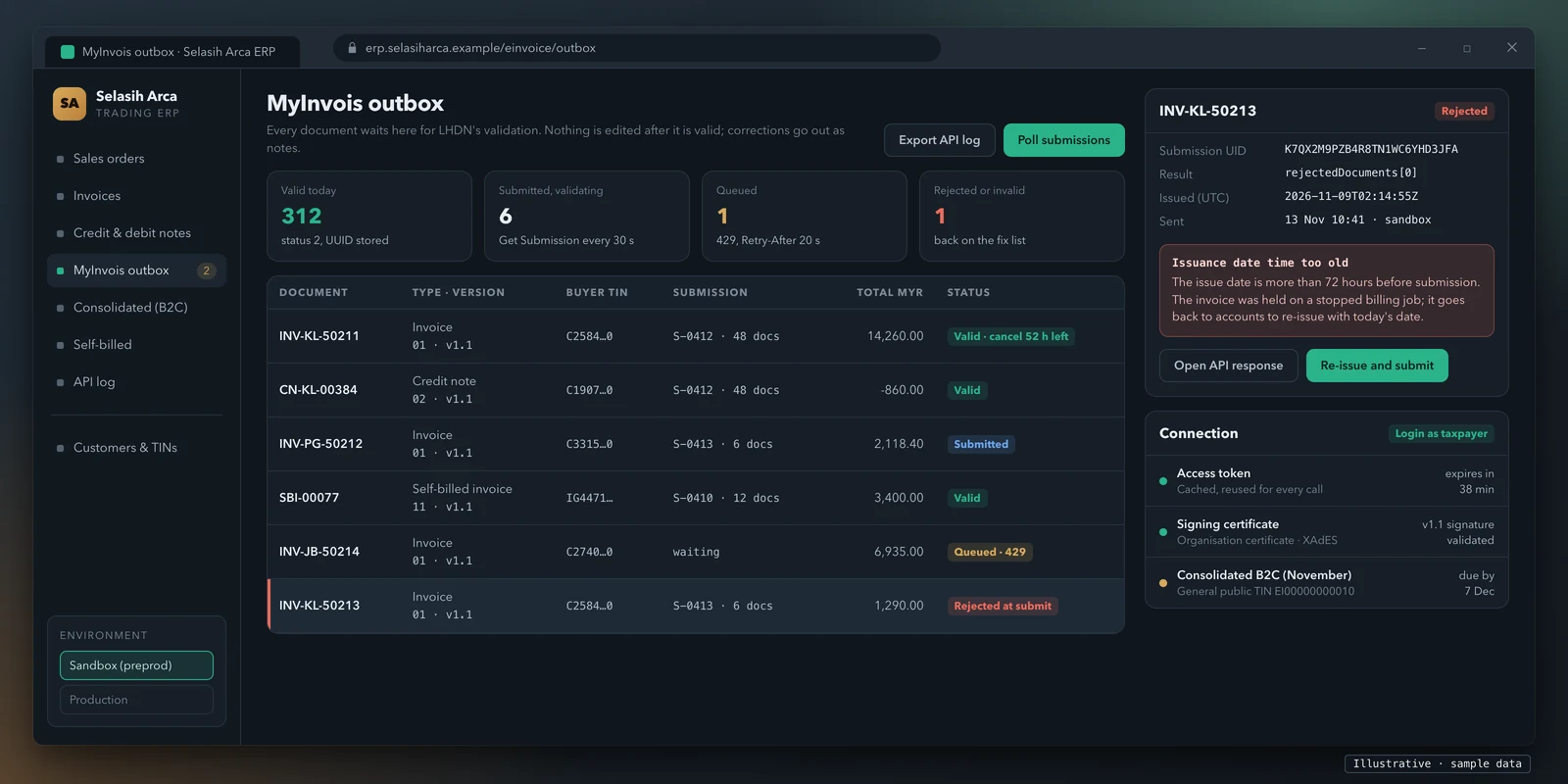
From sandbox to production
MyInvois has a separate pre-production environment, and the SDK FAQ is clear that its credentials are separate too: production client IDs and secrets do not work in the sandbox (a 403 Forbidden is the usual symptom).
- Register the company on the pre-production portal (
preprod.myinvois.hasil.gov.my). Without this, sandbox logins fail. - Register your ERP and get a client ID and secrets. Taxpayers self-provision through "View and Register ERP" on the MyInvois Portal. You get two client secrets, which expire together; LHDN gives two for redundancy, so one can be replaced if the other is compromised.
- Build and test every document type you issue, signed, against the sandbox API.
- Respect the sandbox's limits. It is meant for functional testing, has a lower rate limit than production (from 28 April 2025), and keeps data for a maximum of three months before deleting it. Keep your own test evidence.
- Repeat the registration in production with production credentials, then go live on your implementation date.
Before switching on production, run a short checklist: each issuing entity's TIN validated, certificate installed and not near expiry, every document type passing in the sandbox, the queue and retry rules tested, and someone named to work the fix list in the first weeks.
Limits, errors and retries
The submission and rate limits come from the SDK's Submit Documents and integration practices pages:
| Limit | Value |
|---|---|
| Submission size | 5 MB maximum |
| Documents per submission | 100 maximum |
| Size per document | 300 KB maximum (minify the JSON or XML to fit) |
| Submit Documents | 100 requests a minute per client ID |
| Get Submission | 300 requests a minute |
| Get Document Details | 125 requests a minute |
| Get Document / Validate TIN | 60 requests a minute each |
| Login, Cancel, Reject, Get Recent Documents, Search Documents | 12 requests a minute each |
When a limit is exceeded, the API returns 429 Too Many Requests with a Retry-After header saying how long to wait. Two duplicate rules matter for retries:
- Duplicate submission (422). An identical payload from the same taxpayer within 10 minutes
is rejected as
DuplicateSubmission. - Duplicate document. A document is flagged as a duplicate when its type and version, issuance date and time, internal ID and supplier TIN (buyer TIN for self-billed) all match a document already processed within a 2-hour window.
The SDK names three anti-patterns to avoid: requesting a new token for every call, checking each document's status instead of using Get Submission, and re-submitting the same submission without reading the result. Get Recent Documents also only returns documents issued in the last 31 days; use Search Documents for anything older.
In code, that means an outbox table every document passes through, a worker that batches within the limits, a cached token, back-off that reads Retry-After, no blind re-submission after a 202, and a fix list for rejected and invalid documents with the validator's message.
The 72-hour rules, corrections and MyInvois downtime
There are two separate 72-hour rules, and they are easy to mix up.
1. Cancel or reject within 72 hours of validation. After LHDN validates an e-invoice, the supplier can cancel it, and the buyer can request a rejection, within 72 hours from the time of validation, through the portal or the API (Guideline version 4.8, sections 2.3.6 and 2.4.5). After that, no cancellation is allowed: corrections are made with a credit, debit or refund note. The guideline notes the 72 hours is a convenience; adjusting by note is always possible.
2. Submit within 72 hours of issuance. The SDK FAQ says a document's issuance date and time must be within the 72 hours before submission. Older documents fail with "Issuance date time value of the document is too old and cannot be submitted"; future dates fail too, and times must be in UTC. For a system that holds invoices in a batch job or an approval queue, this is the rule that bites.
When MyInvois is down. Section 2.5.4 of the guideline says that if the MyInvois System is down for maintenance or technical issues and you can show evidence of your compliance efforts, the Director General will evaluate it case by case and will not act against you if the reasons are valid. Your API log, with timestamps and responses, is that evidence.
Penalties. LHDN's FAQ states that failure to issue an e-invoice is an offence under section 120(1)(d) of the Income Tax Act 1967, with a fine of RM200 to RM20,000, imprisonment of up to six months, or both, for each non-compliance. The relaxation period and the voluntary disclosure programme below may apply, with conditions.
B2C, consolidated and self-billed e-invoices
Consolidated e-invoices. Where a buyer does not need an e-invoice (typically consumers), the
supplier issues normal receipts and then aggregates those transactions into a consolidated
e-invoice, submitted within 7 calendar days after the month end (e-Invoice Specific Guideline
version 4.9, published 7 September 2026, section 3). The buyer's TIN on a consolidated e-invoice for
the general public is EI00000000010. Consolidation is not allowed for some activities listed in
section 3.7, such as the sale of motor vehicles and of flight tickets.
Interim relaxation. For taxpayers in the up-to-RM5 million phase (1 January 2026 and 1 July 2026 dates), section 16 of the Specific Guideline sets an interim relaxation period until 31 December 2027, with conditions. During it, taxpayers may issue consolidated e-invoices for all activities and need not issue an individual e-invoice even if the buyer asks, and LHDN will not prosecute under section 120 of the Income Tax Act for non-compliance provided those conditions are met. Read section 16 before relying on it.
Self-billed e-invoices. In certain cases the buyer issues the e-invoice instead of the supplier, for example payments to agents, dealers or distributors, goods or services bought from foreign suppliers, and certain interest and insurance payments (Specific Guideline, section 8.3). If your system buys as well as sells, it needs the self-billed document types 11 to 14.
Special Voluntary Disclosure Programme (SVDP). From 7 July 2026 to 31 December 2027, taxpayers can disclose e-invoices they missed or submitted with errors (Specific Guideline, section 17). LHDN says it will not take compliance reviews or enforcement action on the disclosed e-invoices, except where the disclosures do not comply with the requirements or involve fraud, wilful default or negligence. SVDP documents use the special versions 1.2 and 1.3.
QR code, validation link and sharing the invoice
After validation, the supplier must share the validated e-invoice with the buyer. Until further notice, LHDN allows the supplier to share either the validated e-invoice or a visual representation of it (Guideline version 4.8, sections 2.3.5 and 2.4.4). If you share a visual representation, such as your own PDF invoice, it carries a QR code the buyer can scan to check the e-invoice on the MyInvois Portal.
The SDK FAQ gives the validation link format: {envbaseurl}/{uuid}/share/{longid}, where the base
URL is the e-invoice portal's, and the UUID and long ID come back from Get Submission, Get Document or
Get Document Details. The QR code is generated from that link with any QR generator. So your PDF
template has to wait for validation, then print the link and its QR code.
MyInvois readiness: a tick-list for your system
Tick what your system already does today. Be strict: "we could add it" is not ticked.
Your ticks go into the message for you to read and edit. Nothing is sent until you press send in the form or in WhatsApp.
This runs in your browser. Nothing you tick is sent anywhere unless you choose to send it.
Build or buy: what honestly fits
A custom integration is the right answer only in some cases. Here is how we would decide.
| Your situation | Usually better | Why |
|---|---|---|
| Few invoices a day, typed by hand | The MyInvois Portal | LHDN provides it to all taxpayers; no build needed |
| You use, or can move to, accounting software sold with MyInvois support | That software's module | The vendor keeps it in step with LHDN's changes |
| You want a service to run the connection for you | A technology provider acting as intermediary | It submits on your behalf; check it reads your data cleanly and who keeps the logs |
| Your invoices come from your own ERP, POS or billing system that you will keep | A custom integration into that system | The rules have to live where invoices are created: numbering, notes, consolidation, write-back |
| Several systems issue invoices (ERP, tills, a web shop) | One integration layer across them | One outbox, one queue and one log, whichever system issued the invoice |
If you are replacing your system within the year anyway, integrating the old one is usually money spent twice; choose new software with MyInvois support instead.
What we do on a MyInvois integration
We are a software company founded in 2020 with more than 100 projects delivered. On a MyInvois job we build your side of the API:
- Scope. We read how your system issues invoices, list the issuing entities and document types, find the gaps against the 55 fields, and agree the design: the document builder inside your system or in a separate layer.
- Build. UBL 2.1 JSON or XML for the documents you issue (invoices, notes and, where you need them, self-billed and consolidated documents), XAdES signing, the token cache, the submission queue with retries, Get Submission polling, the UUID and status write-back, cancellation and rejection inside 72 hours, and the validation link and QR code on your invoice template.
- Test. Every document type in LHDN's sandbox, including the error cases: rate limits, duplicates, documents older than 72 hours and invalid data.
- Go live. We support your team through production registration (your company registers the ERP and holds its own credentials and certificate) and the first weeks of live submissions.
What we don't do: we hold no LHDN accreditation, approval or listing, we are not an intermediary that submits on your behalf, and we give no tax advice. The code, credentials and certificate stay yours. We have no office in Malaysia; we work with clients worldwide, and calls and meetings can be arranged to suit you. You get a fixed written quote after a scoping call.
Price for your MyInvois integration
Price for your MyInvois integration
Tell us about your system and we will send a price for the MyInvois integration, and a fixed written quote after a short scoping call.
- Tell us what you need
- Short scoping call
- Price and fixed written quote
Items ticked above: 0. They are in the message below, ready for you to edit.
Prefer WhatsApp? Send the same request there.
Ask for the price on WhatsAppRelated guides
- ZATCA Phase 2 integration for custom ERPs. Saudi Arabia also has your own system talk to the tax authority's API, but adds clearance before the buyer sees a B2B invoice, a hash chain and per-device onboarding.
- UAE e-invoicing: connecting your ERP or billing system. The UAE works the other way: invoices go through an accredited service provider over Peppol.
- UAE e-invoice format: Peppol ID, PINT AE and sample XML
- All guides
- Custom software development, for the systems behind your invoices.
Sources
All re-checked on 13 November 2026.
- LHDN, e-Invoice implementation timeline (page updated 30 August 2026)
- LHDN, e-Invoice guidelines (page last updated 7 September 2026): e-Invoice Guideline version 4.8 (published 30 August 2026) and e-Invoice Specific Guideline version 4.9 (published 7 September 2026)
- LHDN, Implementation of e-Invoice in Malaysia: FAQs (updated 4 September 2026)
- MyInvois SDK: API overview, e-invoicing APIs, Submit Documents, integration practices, signature, document types and versions, e-invoice type codes, FAQ and release notes (last update listed: 25 September 2026)
- MCMC, list of licensed certification authorities
This guide explains published requirements so you can plan the work. It is not tax or legal advice, and LHDN updates its documents: check the current versions on hasil.gov.my and the MyInvois SDK before you build.