

Guide + checker · Order status
B2B order status portal: what to show customers, and where each update should come from
On this page10 sections
Short answer: a B2B order status portal should show each order once, with a status on every line, plain words for the cases that cause calls (part sent, on back order, substituted), a delivery list with tracking links, and a time on every change. The statuses matter less than where they come from: each one should be set by something that really happened in the warehouse or accounts system, never by someone remembering to update a field. Use the checker below to see which moments your customers can't see today.
Which order moments can your customers see?
Tick every moment where a customer has to phone or email you to find out. Be honest: if it happens once a week, tick it.
Your ticks go into the message for you. Add your name and email, and we reply with which statuses we'd start with. Nothing is sent until you press send.
This runs in your browser. Nothing you tick is sent anywhere unless you choose to send it.
The statuses buyers act on
Portal vendors converge on a short default list. B2B Wave's guide to common B2B order statuses describes seven: submitted (also called received), approved, being prepared, awaiting payment, sent, complete and cancelled, with automatic emails recommended at submission and at dispatch and a time stamp on every change. The useful question is what each label should be wired to in your business.
| Status the customer sees | What they decide from it | Where it should come from |
|---|---|---|
| Received | "I don't need to chase" | The order arriving: portal, email or rep entry |
| Confirmed | "Prices and stock accepted" | Your team or an automatic check accepting the order |
| Being picked | "It's not waiting in a queue" | The warehouse starting the pick |
| Part sent | "Two deliveries are coming" | A dispatch covering some, not all, lines |
| On back order, due [date] | "Wait, swap or cancel" | A short line plus a goods-in date you can stand behind |
| Sent | "Someone must be there to take it" | Courier label printed or dispatch confirmed |
| Delivered | "Check it and book it in" | Courier confirmation or signed delivery note |
| Cancelled | "Reorder elsewhere or amend" | A cancellation, with who made it and why |
"Awaiting payment" is on the vendor default list. For trade customers on account terms it is often better kept on the invoice list than on the order, because a paid-up order and an unpaid invoice are different questions.
The awkward cases cause most of the calls
A simple order moves from received to delivered without anyone asking about it. The calls come from four situations, so build those first.
- Back orders. B2B Wave's guide treats back order as a custom status, not a default one. That is the right instinct, but "on back order" with no date is little help. Show the quantity short, the expected date, and what the customer can do about it.
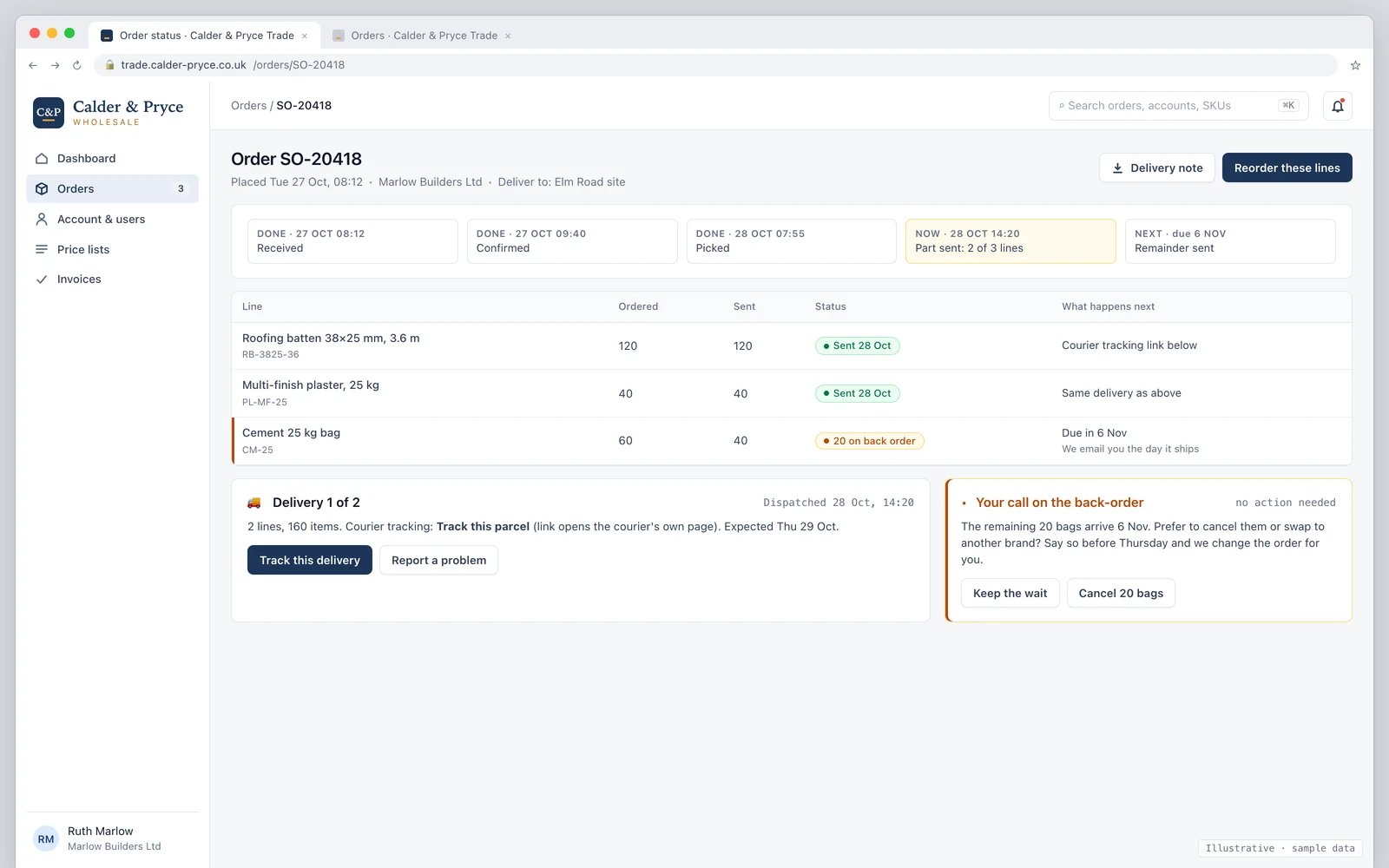
- Part shipments. Show one order with a status per line and a list of deliveries. A single order-level status cannot say "two lines left yesterday, one comes next week."
- Substitutions. If your team swaps a product, the customer's approval should be recorded on the order, with a time. Otherwise the swap is a dispute waiting for the invoice.
- Changes after confirmation. A customer adding a line after the order is picked needs a clear answer: yes, it goes on this delivery, or no, it's a new order.
What your office sees must match
The screen below shows the customer's page for a part-shipped order. The point is not the design. It is that your office staff and reps should see the same page the customer sees, built from the same data, so the call never starts with "our system says something different."
Where each update should come from
There are three ways a status gets set. Only the first two scale.
- From the work itself. Picking, dispatch and goods-in events set the status as the warehouse does them. Nobody retypes anything.
- From a system you already use. Invoice and payment events usually live in your accounts software. Xero has no sales-order stage, for example, so order statuses can't simply be read from it and have to live somewhere else.
- From a person updating a field. This works for a week. After that the status drifts behind the real order, and customers learn to ignore it.
If a status can't come from the first two, drop the label or accept that it will sometimes be wrong. A page that is right on five statuses is better than one that is half right on twelve.
Why the dates on each delivery matter
A status page is a record as well as a convenience, and three official sources show why the dates on it deserve care.
- Part deliveries are a term of the deal, not a default. Under the Sale of Goods Act 1979, section 31, unless otherwise agreed the buyer of goods is not bound to accept delivery by instalments. Consumer contracts are carved out of that subsection, so it matters for trade sales. If you ship in parts, say so in your terms and let the order page show each delivery as it goes. Take advice on how this applies to your contract.
- The delivery date can drive the VAT date. HMRC's manual says the basic tax point for goods is usually their removal, normally the time of delivery by the supplier or collection by the buyer (VATTOS3500). A recorded dispatch or delivery time on each part is useful evidence for your accounts, but your accountant decides the tax point.
- Status emails go to named people. The ICO says the name and number of a business contact is personal data even when the person is acting in a business capacity (business-to-business marketing). Treat the people who receive order emails accordingly: keep a record of who they are, and don't fold marketing into a dispatch message.
Notifications: send fewer, and make them useful
Each change can send an email, but most buyers want only two: confirmation that the order was received, and a dispatch message with the tracking link and what is in the delivery. B2B Wave's guide recommends tracking information and an expected delivery date at dispatch, which matches what trade buyers ask for. Back-order changes deserve their own message, because that is the one where the customer has to decide something.
When you don't need a portal for this
If you ship a handful of orders a week and customers already email you, an automatic confirmation and a dispatch email with the tracking link will cover most of it. A status page earns its cost when your office keeps answering the same questions, or when part shipments and substitutions are common. For the wider picture, see our B2B ordering portal page and the guide to what a portal costs over three years. Merchants who sell by the pallet and by the bag will recognise the part-shipment problem; see building supplies.
How we'd approach yours
We start with a 20-minute walkthrough of how an order moves today, then a fit check of your products, customers, price lists and warehouses, and only then a fixed plan and timeline. You get a fixed quote with the full cost known before work starts. The portal we run for a UK wholesaler today covers sales and warehousing; anything beyond that, such as courier links or substitution approvals, is something we'd build for you, not a feature we claim to have off the shelf. If an email at dispatch is enough, we'll say so.
Book a 20-minute walkthrough or send us how an order moves today and we'll mark up the statuses we'd show.
Sources
-
B2B Wave, Common B2B order statuses in ecommerce: default status list, custom statuses (back order), notification and time-stamp guidance
-
Legislation.gov.uk, Sale of Goods Act 1979, section 31: delivery by instalments
- HMRC, VATTOS3500, the basic tax point (updated 8 April 2025)
- ICO, Business-to-business marketing
Last reviewed 2 November 2026. This guide describes one vendor's published list of statuses and our own working method; it isn't a product comparison or legal advice.