

Guide + checker · Xero and order handling
Does Xero have sales orders? What it has instead, and where each workaround breaks
On this page8 sections
Short answer: no. Xero's standard plans have quotes, invoices, repeating invoices and purchase orders, but no sales order document, and its Accounting API lists endpoints for quotes, invoices and purchase orders but none for sales orders. The only Xero product with sales orders is Inventory Plus, sold as an add-on to Xero's US plans for Shopify and Amazon FBA sellers. Everyone else uses quotes, draft invoices, the new backorders feature or a separate order system that sends invoices to Xero. Which one fits depends on whether your orders change, ship in parts or need a credit check before they leave.
From our side
When a wholesaler tells me Xero doesn't do sales orders, I ask where Tuesday's open orders are right now. The answer is usually a mix: some as quotes, some as draft invoices, a few in someone's inbox. The fix is rarely more Xero settings. It's deciding that the order lives in one place, and Xero gets an invoice only when goods leave.
— Avi Singh, Founder
What Xero gives you instead of a sales order
A sales order is a promise between "the customer asked" and "we invoiced". It holds quantities that can still change, stock that is spoken for, and lines that are still to follow. Xero has documents that each cover part of that, but none covers all of it.
| Xero document | Who it's for | What it does well | Why it isn't a sales order |
|---|---|---|---|
| Quote | Customer | Five stages from Draft to Invoiced; the customer accepts online; converts to an invoice without retyping | Through the API, an accepted quote's lines can't be edited; no part shipments; holds no stock |
| Draft invoice | Customer | Fully editable; can carry the order number in its reference | Not approved, and approval is the point where Xero uses up tracked stock, so a draft holds nothing |
| Approved invoice with backorder | Customer | Uses available stock at once; the shortfall is filled oldest first as stock arrives | The customer is invoiced before goods leave; it records no order changes or order confirmation |
| Purchase order | Supplier | Orders stock in, becomes a bill | It's for buying, not selling; it can't hold a customer's order |
| Repeating invoice | Customer | The same lines on a schedule | Standing orders only; no backorders from them |
Two details from Xero's own documentation decide most of this. First, the Quotes API sets which fields can change in each status: in Draft and Sent, all of them; once a quote is Accepted or Invoiced, only contact details and notes. An accepted quote can be set back to Sent and edited again, but then your record no longer shows what the customer actually agreed to. The Xero app may allow more editing than the API does, but either way a quote holds one version of the order and nothing about what has shipped. Second, Xero's developer blog (18 August 2026) says that, in this release, backorders are created from sales invoices only. Quotes, receive-money transactions, repeating invoices and inventory adjustments don't create them.
The four workarounds, compared
| Workaround | Works when | Breaks when |
|---|---|---|
| 1. Quotes as orders | Each order is priced, agreed and delivered in one go, such as a job or a one-off pallet | Customers add lines after saying yes, you ship in parts, or the warehouse needs a pick list before the invoice exists |
| 2. Draft invoices as orders | A small team, few changes, and stock you check by eye | Drafts don't use up stock, so twenty open drafts can promise the same last case twice. Drafts are also easy to approve by mistake before goods leave |
| 3. Invoice at order, backorder the rest | Customers accept being invoiced when they order, and shortfalls are routine | You need a credit check before invoicing, customers amend orders, or your terms start from delivery. Credit notes pile up for every change. Canada and Singapore aren't supported yet |
| 4. An order layer in front of Xero | Orders arrive from reps, a portal, email or phone; prices vary by customer; part shipments are normal | It costs more than a setting change, so it's overkill if workarounds 1 to 3 already cope |
Workaround 3 is new. Xero's developer blog says that until backorders, the options for selling a
tracked item you didn't have enough of were draft invoices, manual adjustments or a spreadsheet.
Now Xero can approve the invoice, use what's available and fill the rest later, and the invoice can
be paid before the stock arrives. Through the
Invoices API it is opt-in: a
request that would create a backorder fails with an "Insufficient stock" message unless the
app sends allowBackorders=true. If a connected app pushes invoices to your Xero, ask its
supplier whether they have switched this on, because the same order can behave differently when
keyed by hand and when synced.
The UK VAT side: when you invoice changes when VAT is due
For UK VAT-registered sellers, choosing between workarounds 1 to 4 is also choosing a tax point. Under VAT Notice 700, section 14.2.1, the basic tax point for goods is usually the date you send them to the customer or the customer takes them away. Section 14.2.2 adds that if you issue a VAT invoice before then, the tax point for the amount invoiced is the invoice date. So workaround 3, invoicing at order and backordering the rest, brings VAT forward to the day of the order, for goods that may not ship for weeks. Invoicing per dispatch keeps the tax point with the goods.
Two smaller points follow from the same guidance. If you want to send customers something that looks like an invoice before they pay, section 17.3 says a pro-forma should be clearly marked "this is not a VAT invoice". And VAT Notice 700/21, section 3.1, says you normally have to issue a VAT invoice within 30 days of the supply, so a balance left uninvoiced on an order for weeks after it ships is a problem in its own right. Your accountant can tell you how this lands for your business; the system point is that the invoice should be raised by the dispatch, not by whoever remembers.
Which workaround fits your orders?
Tick everything that is true of a normal week. It takes about thirty seconds, and the result tells you which workaround you have already outgrown.
Your ticks go into the message for you. Add your name and email, and we reply by email with the workaround we'd use and why. Nothing is sent until you press send.
If you add an order layer, what should Xero receive?
The rule we use is simple: the order lives in the order system, and the money lives in Xero. The order system handles the parts Xero doesn't, such as quantities that change, picking, part shipments and credit checks. Xero gets a clean sales invoice each time goods actually leave. Done that way, nobody edits or credits invoices because a customer changed their mind on Tuesday.
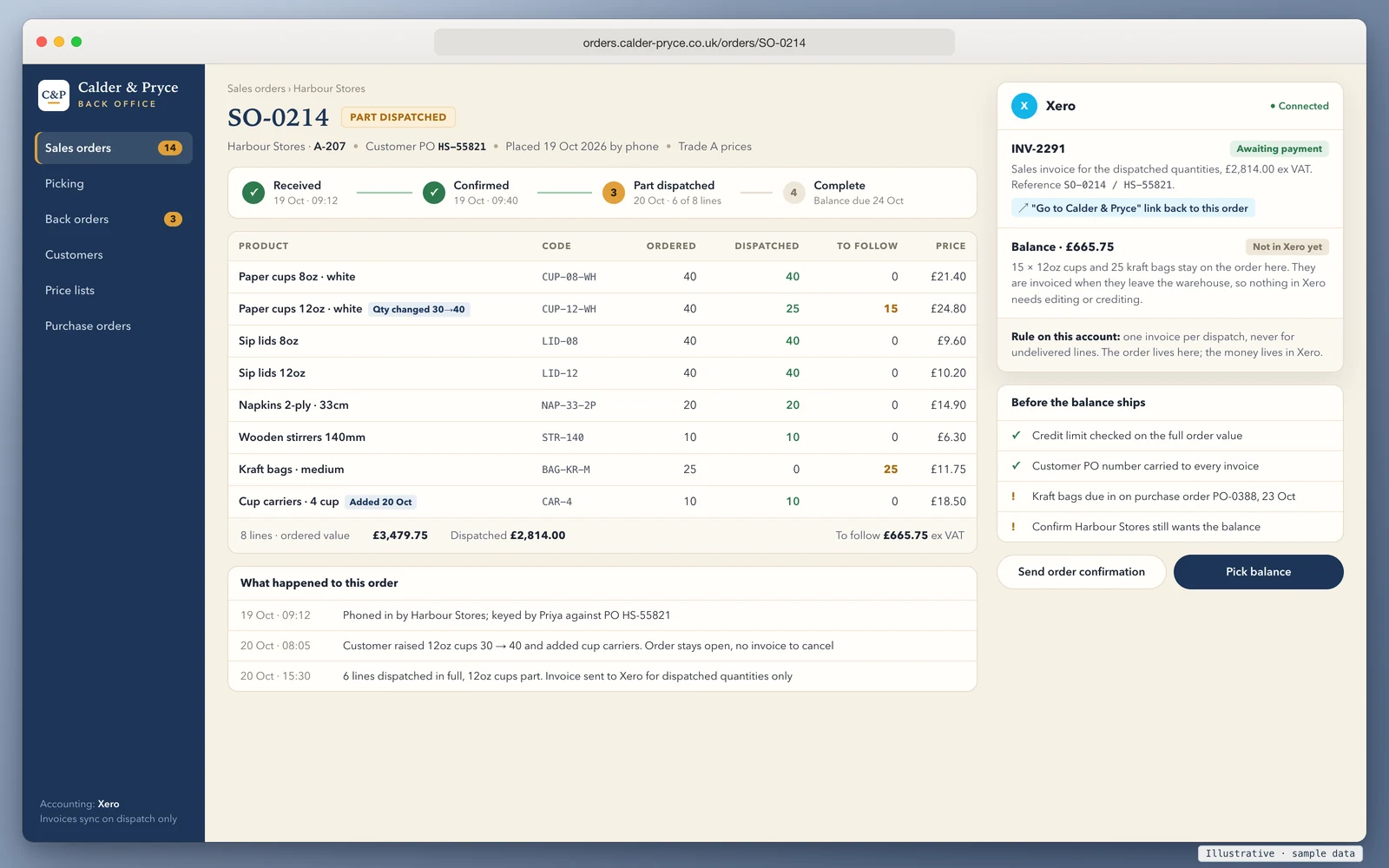
Five things to check in any order layer, ours or anyone else's:
- One invoice per dispatch, for dispatched quantities only. The balance stays on the order until it ships. If you'd rather invoice at order, use Xero's backorders for the shortfall rather than inventing a second system for it.
- The order number and customer PO on every invoice. The Invoices API has a Reference field on sales invoices, and apps can look invoices up by it, so "HS-55821" stays attached to the invoice in Xero instead of living only in the order system.
- A link back to the order. The same API has a
Urlfield that Xero shows as "Go to [app name]" on the invoice. It costs nothing to fill in and saves a phone call every time someone asks what was actually ordered. - A digital link, not retyping. HMRC's Making Tax Digital notice, section 3.2.1, counts API transfer as a digital link and copy-and-paste as not one. An order layer that writes invoices into Xero through the API keeps that chain intact.
- Stock kept in one place. If the order layer tracks stock by warehouse, don't also track those items as inventory in Xero, or the two will drift. Pick one owner of the stock figure and let the other report it.
For how orders get into the order layer in the first place, see AI order processing for emailed purchase orders and the B2B ordering portal for customers who order themselves. If you're weighing a subscription app against a build, B2B ordering portal cost walks through the three-year sums. On QuickBooks instead? Does QuickBooks Online have sales orders covers which plans have them.
How we'd approach it
We build order systems that sit in front of accounting software and connect to Xero, Sage and QuickBooks through their official APIs. You own the code and the data, with CSV export at any time. We don't start from nothing: a trade portal we built covers sales and warehousing and is used every day by a UK wholesaler.
The route is the same each time. A 20-minute walkthrough, then a fit check of your products, customers, price lists and warehouses. After that comes set-up and import on a fixed plan and timeline, then training and close support through the first weeks of live orders. You get a fixed quote after the walkthrough, with the full cost known before work starts and run costs listed separately. If the checker above says Xero alone will do, we'll say the same on the call.
Book a 20-minute walkthrough or send us one awkward order, such as a part shipment or an order changed after it was placed. We'll show you where it would live and what Xero would receive.
Sources
- Xero Developer, Accounting API overview: list of endpoints (accessed 22 October 2026)
- Xero Developer, Quotes: valid status changes and status-based editable fields (accessed 22 October 2026)
- Xero Developer, Invoices:
allowBackorders, Reference andUrlfields (accessed 22 October 2026) - Xero Developer, Purchase Orders (accessed 22 October 2026)
- Xero UK, Purchase order software: turning an approved purchase order into a bill (accessed 22 October 2026)
- Xero Developer Blog, Backorders are coming to the Invoices API (18 August 2026)
- HMRC, VAT guide (VAT Notice 700), sections 14.2.1, 14.2.2 and 17.3
- HMRC, Record keeping (VAT Notice 700/21), section 3.1
- HMRC, VAT Notice 700/22: Making Tax Digital for VAT, section 3.2.1
- Xero UK, Quotation software: quote stages and quote-to-invoice conversion (accessed 22 October 2026)
- Xero App Store US, Xero Inventory Plus: sales orders, channels and availability (accessed 22 October 2026)
Last reviewed 22 October 2026. Xero changes features often; check the pages above on the day you decide. This guide doesn't rank or recommend Xero apps, and it isn't tax advice.