
Guide · UAE e-invoicing
UAE e-invoicing in Odoo, SAP Business One and Zoho Books: what's ready and what you still have to do
On this page10 sections
Short answer: for UAE e-invoicing, Odoo has no official module yet, SAP Business One's Peppol framework isn't listed for the UAE by SAP, and Zoho Books has Zoho's own accredited service built in. Whichever you run, you still appoint one ASP, clean your master data, map the 51 fields and test credit notes before go-live.
From our side
When we built our own trade portal, the hard part was never producing an invoice — it was keeping customer and product records consistent. UAE e-invoicing asks for exactly that: a Peppol ID for every buyer, the emirate from a fixed list, a proper unit code instead of "ctn". Whether you're on Odoo, SAP or Zoho, that clean-up is where we'd start this month.
— Avi Singh, Founder
Businesses with revenue of AED 50 million or more must appoint an Accredited Service Provider (ASP) by 30 October 2026 and go live on 1 January 2027. Most UAE firms in that bracket run on an ERP or accounting package, and the question that matters is simple: "Is our system ready?" This guide answers it for the three systems that come up most often, using only what Odoo, SAP and Zoho publish themselves, checked on 6 October 2026. For the dates by revenue band, the scope rules and the field-by-field mapping, see our guide to ERP integration for UAE e-invoicing.
The work that sits with you, whichever ERP you use
The UAE model runs on Peppol. Your system hands invoice data to your ASP, the ASP checks it, turns it into PINT AE XML, delivers it to the buyer's ASP and reports it to the Federal Tax Authority. No ERP talks to the FTA directly. That leaves seven jobs on your side, and no vendor does them for you:
| Job | What it involves | Why the ERP can't do it alone |
|---|---|---|
| Appoint one ASP | One contract per business, chosen in the e-invoicing tile of EmaraTax | Only you can sign it, and it covers every system you invoice from |
| Fix master data | Buyer TRN and 10-digit TIN, Peppol ID (0235: plus the TIN), emirate, unit-of-measure codes, a tax category on every item |
The software stores what your staff typed in years ago |
| Map the 51 fields | Match each mandatory field to a column, a setting or a fixed rule (49 for a commercial e-invoice) | Most packages hold the data in places PINT AE doesn't expect |
| Make credit notes behave | Every correction, return or cancellation becomes an e-credit note that references the original | Many teams still edit or delete posted invoices |
| Test with the ASP | Send and receive real scenarios in the ASP's test environment | Only the ASP's validation tells you what it rejects |
| Keep the records | Store e-invoices, credit notes and ASP responses for the retention period, normally five years | Check whether your ERP or the ASP keeps the XML, and for how long |
| Change the process | Issue and transmit within 14 days of the transaction or payment, whichever is earlier, and work a daily rejection queue | Software can warn people; it can't make them clear the queue |
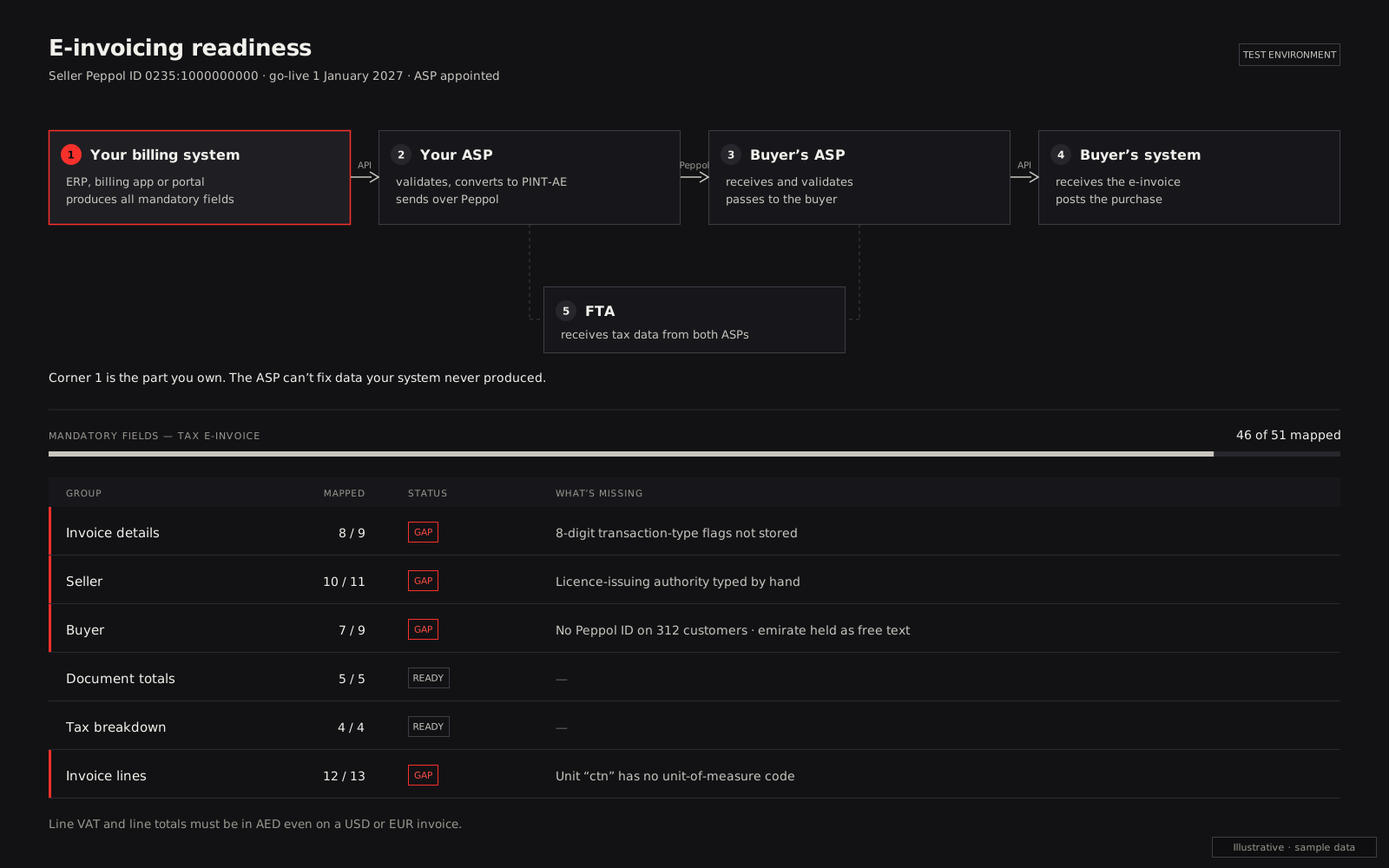
ERP readiness at a glance
This is what each vendor says in its own documentation today, not what resellers or implementers claim. All three were checked on 6 October 2026, along with the Ministry of Finance's ASP list, which, when we checked it on 6 October, named 64 fully accredited providers and 2 more in the final production assessment.
| ERP | What the vendor officially provides for UAE e-invoicing | What you still need | Typical gap |
|---|---|---|---|
| Odoo (19.0 and 20.0) | UAE localisation for VAT, corporate tax, Central Bank exchange rates and Arabic invoices. No UAE e-invoicing feature in the docs; the UAE isn't on Odoo's Peppol registration list; Odoo isn't on the MoF's ASP list | An ASP, plus a connector: a third-party Odoo app or a custom integration to the ASP's API | Customers without a TRN fall back to simplified invoices; emirate and unit codes not held as codes |
| SAP Business One (10.0) | A Peppol Exchange framework (invoices, credit and debit memos, orders) through SAP Document and Reporting Compliance, cloud edition. SAP's support table lists that for 14 countries; the UAE isn't one of them | An ASP, plus a partner add-on or an integration through B1's APIs | Heavily customised user-defined fields, and add-ons that create invoices outside standard documents |
| Zoho Books (UAE edition) | Zoho states it is an MoF-accredited ASP. Zoho Books sends invoices and credit notes and receives bills and vendor credits over Peppol | Set-up in Zoho Books and EmaraTax, data clean-up, a routine for failed pushes | Invoices raised in other systems (POS, e-commerce, a custom portal) that also need the same ASP |
The table shows something easy to miss. "Peppol-ready" in Europe doesn't mean ready for the UAE. Odoo and SAP Business One both exchange Peppol documents in other countries, but neither vendor's documentation lists the UAE network or the PINT AE format for these products today.
Odoo: what Odoo publishes for the UAE today
Odoo's UAE localisation documentation for version 20.0 (and the matching 19.0 page) lists three modules: UAE Accounting, Accounting Reports and Point of Sale. They give you a UAE chart of accounts, the 5%, zero-rated, exempt, reverse-charge and out-of-scope taxes, the VAT201 and corporate tax reports, automatic exchange rates from the Central Bank of the UAE and an Arabic second language on invoices. There is no e-invoicing section. The Odoo 20 release notes add an FTA VAT audit file and a new chart of accounts for the UAE, again with nothing on e-invoicing.
Odoo does run its own Peppol access point. Its electronic invoicing documentation lists the countries where you can register for Peppol through Odoo, mostly European, and the UAE isn't among them. Its list of country-specific e-invoicing pages includes Saudi Arabia, Egypt and Jordan, but not the UAE. Odoo also doesn't appear on the MoF's ASP list. So any UAE e-invoicing Odoo app you find comes from a third party on the Odoo Apps store, often an ASP or an implementation partner, not from Odoo itself.
One detail in Odoo's UAE docs matters for e-invoicing. The 20.0 page says that if the TRN field on a customer is empty, Odoo issues a simplified tax invoice, and it suggests typing "N/A" when a tax invoice is needed but the TRN is unknown. Once you're in the e-invoicing system, business customers need full e-invoices, as our UAE tax invoice requirements guide explains. A customer record holding "N/A" or a blank TRN will fail validation at the ASP.
Odoo readiness checklist
- Note your Odoo version and whether you're on Odoo Online, Odoo.sh or self-hosted. That decides which third-party apps you can install, or whether a custom module is the only route.
- Ask your shortlisted ASPs whether they have an Odoo connector for your exact version, who maintains it and how it behaves after an Odoo upgrade.
- Find every customer with a blank or "N/A" TRN who buys as a business, and collect the real TRN. Collect each customer's Peppol participant ID too.
- Replace free-text emirates with a fixed list and give every product a unit-of-measure code.
- Check each Odoo tax and fiscal position maps to one PINT AE tax category.
- Turn on Central Bank automatic rates if you invoice in USD or EUR, so the AED line amounts are there.
- Stop resetting posted invoices to draft to edit them. Use credit notes instead.
- Test with the ASP: invoice, credit note, foreign currency, a free-zone sale and an export.
SAP Business One: Peppol framework, but no UAE listing
SAP Business One 10.0 has an electronic-documents framework for Peppol. SAP's help page on working with Peppol says it supports A/R and A/P invoices, credit memos, debit memos and orders, with an Electronic Document Monitor for sent documents and an import wizard for incoming ones. The exchange itself runs through SAP Document and Reporting Compliance, cloud edition, connected to B1 with SAP's Cloud Connector, the Electronic Document Service and the integration framework, as SAP's integration guide describes.
The catch is the country list. SAP's table of supported compliance tasks for that cloud service, read on 6 October 2026, shows Business One Peppol Exchange for 14 countries, mostly in Europe plus Japan, New Zealand and Singapore. The UAE rows cover S/4HANA, S/4HANA Cloud, SAP ERP and SAP Ariba, not Business One. SAP's Middle East entity is on the MoF's ASP list, and SAP's April 2026 announcement talks about Document and Reporting Compliance for core ERP systems without naming Business One. We found no public SAP page that states UAE PINT AE support for B1, so until SAP publishes one, plan on a partner add-on or an integration you own.
SAP Business One readiness checklist
- Record your B1 version, feature package and database (SQL Server or HANA), and every add-on that creates or changes A/R invoices.
- Ask your SAP partner in writing whether your UAE e-invoicing route is SAP's own service, a partner add-on or a connector supplied by your ASP, and who supports it after a B1 upgrade.
- List the user-defined fields your team relies on. PINT AE has no room for extra fields, so each one either maps to a standard field or stays internal.
- Fill business partner master data: TRN, TIN, Peppol ID, emirate, and an address that matches the customer's registration.
- Check A/R credit memos are always based on the original invoice, not keyed as stand-alone documents.
- Confirm where the e-invoice XML and the ASP's responses are stored, and for how long.
- Test intercompany and VAT-group invoices separately; group members each onboard under their own TIN.
Zoho Books: the ASP is built in
Zoho's UAE e-invoicing page says Zoho is an ASP accredited by the Ministry of Finance, and Zoho Software Trading LLC appears on the MoF's list. The Zoho Books help guide describes the flow. You enable taxes and enter your TRN, add your TIN, registered name, address and the email you use for EmaraTax, then go to EmaraTax and select Zoho as your ASP. Invoices and credit notes move from "Yet To Be Pushed" to "Pushed", with a UUID, or to "Failed" with the error shown. Incoming invoices and credit notes arrive as draft bills and vendor credits.
Two rules in that help guide change how finance teams work. A pushed invoice can't be deleted, and the fields that feed the e-invoice can't be edited; corrections go through a credit note. Zoho's page also says the first 100 e-invoicing transactions are free on Professional and higher plans, with paid packs after that, so check your plan and volume.
Zoho Books being the ASP solves the network side, not the data side. And because a business can have only one ASP, anything you invoice from outside Zoho Books has to reach Zoho as well.
Zoho Books readiness checklist
- Confirm you're on a UAE edition plan that includes e-invoicing, and estimate your yearly volume.
- Complete the organisation profile: registered name, TIN, TRN, address, EmaraTax email.
- Add TRN and Peppol details to every business customer and vendor.
- Agree who watches "Failed" invoices every day and fixes them within the 14-day window.
- Train staff that a sent invoice is final; changes mean a credit note.
- List every other system that raises invoices (shop, POS, a custom portal, a second ERP) and decide how each one reaches Zoho, or moves its invoicing into Zoho Books.
Custom or heavily customised ERPs
The vendor's position matters less once your system has been bent to fit the business. These are the things that break e-invoicing projects in customised Odoo, B1 and Zoho set-ups, and in fully custom billing systems:
- Custom fields that carry tax meaning. A field called "Free zone?" or "Export ref" built by a former developer has to feed the right PINT AE value, or the ASP rejects the invoice.
- Invoice templates doing the work. Many teams fix wording, Arabic text or totals in the PDF template. The e-invoice ignores the template, so any logic in it must move into the data.
- Integrations that bypass the ERP. Invoices pushed in from an e-commerce site, a POS or a WhatsApp ordering flow sometimes skip validation and use their own numbering. Each one must go to the same ASP with unique, sequential numbers.
- Modified posting rules. Custom code that lets users edit posted invoices or reuse numbers conflicts with credit-note-only corrections.
- Old versions. A connector built for the current release may not install on a heavily customised older one. Budget for a custom connector, or an upgrade, before you sign.
- Offshore hosting. Records can sit outside the UAE if they stay secure and can be produced in full when the FTA asks, according to the MoF's e-invoicing guidelines. Check your ERP host and ASP together meet that.
Common pitfalls
- Treating "Peppol-ready" as "UAE-ready". Peppol formats differ by country. Ask for PINT AE, by name, for your product and version.
- Choosing the ASP before mapping the data. Run the mapping first, then ask each ASP about the gaps you found.
- Signing two ASPs. One per business. Plan a single route for every system that raises invoices.
- Leaving buyer IDs to the last week. Customer TRNs, TINs and Peppol IDs take weeks to collect.
- Testing only a clean invoice. Credit notes, foreign currency, free-zone, export and summary invoices are where rejections show up.
- No owner for rejections. Late e-invoices cost AED 100 each, up to AED 5,000 a month, under Cabinet Decision No. 106 of 2025.
- Upgrading mid-project. A major Odoo or B1 upgrade during testing can break a connector. Freeze versions until you're live.
How we help
We aren't an Odoo, SAP or Zoho partner, and we aren't an Accredited Service Provider. We're a software company with a development team in India, working with UAE businesses remotely, and we build. We map your Odoo, SAP Business One or Zoho Books data to the mandatory fields, fix the customer and product records, write the custom module or connector where no ready one fits your version and customisations, and connect your system, plus any shop or portal that invoices on the side, to the ASP you choose through its API. Rejections come back into your system with a queue your team can work.
You get a fixed quote after a 20-minute call, so you know the full cost before we start. Book a call or ask for a price. For the wider picture, read our ERP integration guide, our tax invoice requirements guide, or see what we build for UAE businesses.
Sources
- Ministry of Finance, Accredited and pre-approved e-invoicing service providers (last updated 5 October 2026)
- Ministry of Finance, eInvoicing programme hub (accessed 6 October 2026)
- Ministry of Finance, UAE Electronic Invoicing Guidelines v1.1 (1 June 2026)
- Ministry of Finance, UAE Electronic Invoice mandatory fields v1.0 (23 February 2026)
- Ministerial Decision No. 243 of 2025 on the Electronic Invoicing System (2025)
- Ministerial Decision No. 66 of 2026 (May 2026)
- Cabinet Decision No. 106 of 2025 on e-invoicing violations and penalties (8 December 2025)
- OpenPeppol, PINT-AE specification 1.0.4 (29 July 2026)
- Odoo, United Arab Emirates localisation, version 20.0 and version 19.0 (accessed 6 October 2026)
- Odoo, Electronic invoicing (EDI), version 20.0 (accessed 6 October 2026)
- Odoo, Odoo 20 release notes (accessed 6 October 2026)
- SAP, Working with Peppol, SAP Business One 10.0 (accessed 6 October 2026)
- SAP, Integrating Peppol Exchange with SAP Business One (accessed 6 October 2026)
- SAP, Supported compliance tasks, SAP Document and Reporting Compliance, cloud edition (accessed 6 October 2026)
- SAP MENA, Ministry of Finance approves SAP as e-invoicing service provider (7 April 2026)
- Zoho, UAE e-invoicing in Zoho Books (accessed 6 October 2026)
- Zoho, Generating e-invoices with Zoho Books (accessed 6 October 2026)
Last reviewed 6 October 2026. Vendor positions change quickly, so check each vendor's current documentation before you sign anything. This guide explains published guidance and isn't legal or tax advice.