
AI order processing
AI order processing: from emailed PO to approved sales order
We build AI agents that read the purchase orders your customers email, PDF or photograph, match every line to your products and prices, and put a draft sales order in front of a person to approve. Built for wholesalers and distributors on Xero, QuickBooks, Zoho Books, Sage or a trade portal, not for SAP.
In short: AI order processing reads the purchase orders your customers send by email, PDF, spreadsheet or photo, matches each line to your product codes, units and price lists, and builds a draft sales order. A person checks the flagged lines and approves it, and only then does it reach your portal, accounts or warehouse. The AI does the typing; your team keeps the decisions.
Most pages about this are written for companies running SAP, Oracle or Dynamics. This one is for wholesalers and distributors with a smaller stack: an accounting system such as Xero, QuickBooks, Zoho Books or Sage, a trade portal, and an inbox where orders pile up every morning.
It fits if your team retypes orders from email, PDF or WhatsApp into another system, and the same customers order the same kinds of products week after week. It fits less well if most orders are already placed online, or if you get a handful of orders a day and nobody minds keying them.
Coded Idea builds a lot of software for wholesale. Our trade portal runs sales and warehousing day to day for a wholesaler, and an AI order inbox is something we build on top of that portal or on top of the system you already use.
How an emailed PO becomes a draft sales order
This is the flow we set up, step by step:
- Capture. A shared mailbox (Gmail or Outlook) or a WhatsApp Business number receives the order. The agent picks up the email body and any attachment: PDF, Excel, Word or a phone photo.
- Identify the customer. Sender address first, then account number or company name on the document. A new sender is never guessed; it goes to a person.
- Extract the lines. A language model pulls out product descriptions or codes, quantities, units, prices quoted, PO number, delivery address and requested date.
- Match to your catalogue. Each line is matched against that customer's history, their own part numbers and your product list, with the unit converted to how you sell it.
- Check against rules. Price against the customer's price list, stock by warehouse, credit limit, minimum order and duplicate PO numbers.
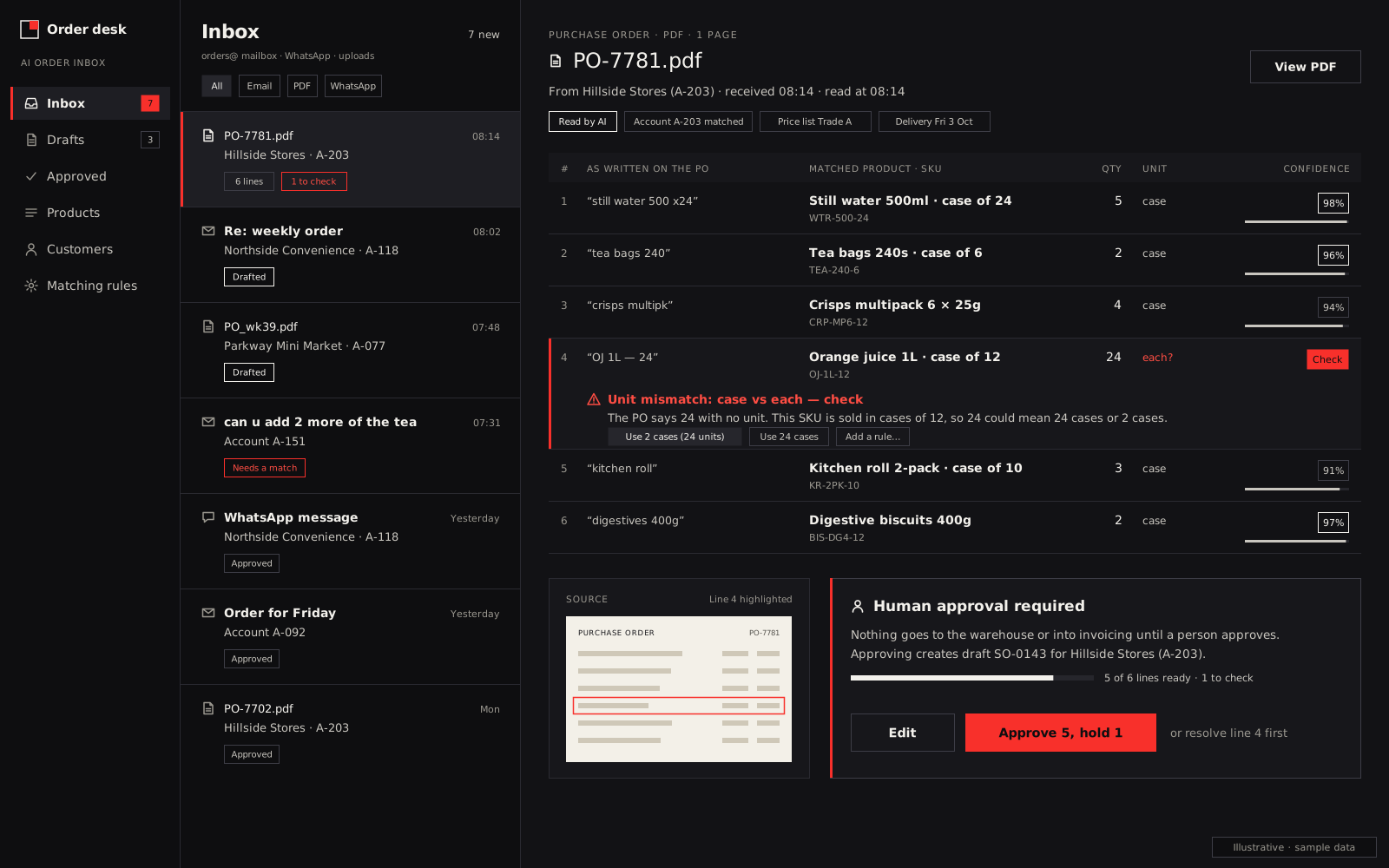
- Draft and flag. A draft sales order is built. Each line is marked clean, check or stop.
- Approve and post. A person reviews the flags, fixes anything wrong and approves. Only then is the order created, stock reserved and the customer sent a confirmation.
Every correction in step 7 is saved to that customer's mapping, so the same mistake doesn't come back next week.
Where AI order processing goes wrong, and what we do about it
These are the problems that decide whether a project works, and most vendor pages skip them.
| Problem | Example | How we handle it |
|---|---|---|
| Unit-of-measure mismatch | Customer orders "5 cases"; you sell singles, and their case is 10 but yours is 12 | Per-customer unit table; any conversion shown on the line for approval |
| Customer part numbers | The PO says "ABC-771", your code is "LQ-10-MNT" | Cross-reference table built from past orders and every approval |
| Handwritten or photographed POs | A photo of a paper order pad taken in a shop | Lower confidence by default; every line goes to a person |
| Price overrides | PO shows 3.10 a unit, price list says 3.40 | Never accepted automatically; flagged with both prices |
| Vague lines | "Same as last week plus 2 more of the mint" | Pulls the last order as a starting point and flags the change |
| Duplicates | The same PO forwarded by two people | PO number and content checked against recent orders |
| New delivery address | A branch you haven't delivered to before | Held for a person to confirm |
| Mixed languages or formats | A PO in another language, or dates written day-first vs month-first | Language and date format set per customer; anything ambiguous flagged |
The approval screen: where a person stays in charge
The approval screen shows the original email or document on one side and the draft order on the other, line by line. Clean lines are pre-ticked. Lines needing a check show why: unit converted, price differs, low stock, or low confidence in the read.
Our rules for what never goes through without a person:
- a price different from the customer's price list
- a product or part number not seen before for that customer
- an order over the customer's credit limit
- a first order from a new sender or a new delivery address
Once the drafts prove reliable, you can decide to let clean repeat orders from named customers post straight away. That's your call, made on your own numbers, not ours.
Where the approved order lands
Xero doesn't have a separate sales order document (its users have been asking Xero for one), so for Xero users the order usually lands in a trade portal, then flows to Xero as an invoice when it ships. Where your system has sales orders, as Sage 50 and Sage 200 do, the draft can go straight in. We connect to accounting systems such as Xero, QuickBooks, Zoho Books and Sage through their official APIs. If you want the portal as well, see our B2B ordering portal; if orders mostly arrive on WhatsApp, see WhatsApp ordering for wholesalers.
Worked example: is it worth it?
Illustrative figures only, not results from a client. A wholesaler receives 40 emailed orders a day, and keying each one takes 6 minutes: 240 minutes, or 4 hours a day.
With drafts, suppose 35 orders need only a check at 1.5 minutes each (52.5 minutes) and 5 need fixing at 6 minutes each (30 minutes). That's 82.5 minutes a day, a saving of 157.5 minutes. Over 250 working days, that's about 656 hours a year. Your own numbers will differ, which is why we measure them first.
What to measure before and after
Measure these for two weeks before go-live, then again after:
- minutes from order received to order confirmed
- minutes of staff time per order
- orders keyed per person per day
- credit notes and returns caused by wrong items, quantities or prices
- share of drafts approved with no edits
- size of the exceptions queue at the end of each day
If the share of untouched drafts isn't rising after the first weeks, the mapping tables need work, and we'd rather tell you than hide it.
Data protection and the AI provider
Purchase orders contain personal data: buyer names, emails, phone numbers and delivery addresses. The AI provider that reads them processes that data on your behalf, so under most data-protection laws you need a written contract with it, and if it processes data in another country, the rules on cross-border transfers may apply. We set the agent up on providers' business APIs with a data processing agreement, check whether they train on your data (Anthropic, for example, states it doesn't use commercial inputs for training by default), and host the rest of the system in the region you need.
If you're in the UK
Under UK GDPR the AI provider is your processor, and the ICO is clear that processing by a processor must be governed by a contract that meets Article 28. If the provider processes data outside the UK, that's a restricted transfer and needs adequacy regulations or safeguards such as the IDTA. We can host the rest of the system in the UK or EU. Xero and Sage are the usual accounting systems for smaller wholesalers there, and both are covered above. For the rest of what we do there, see our UK wholesale ordering software page.
How we set it up
It starts with a 20-minute walkthrough. Bring a week of real orders, the awkward ones included. We map your customers, products, units and price lists, then agree a fixed plan and timeline. You get a fixed quote and know the full cost before work starts. Coded Idea has been building software since 2020, with a development team in India that you deal with directly.
For other jobs worth automating, such as statements, payment chasing and stock alerts, see AI automation for business.