
AI agents and automation
AI automation for business: what to automate first
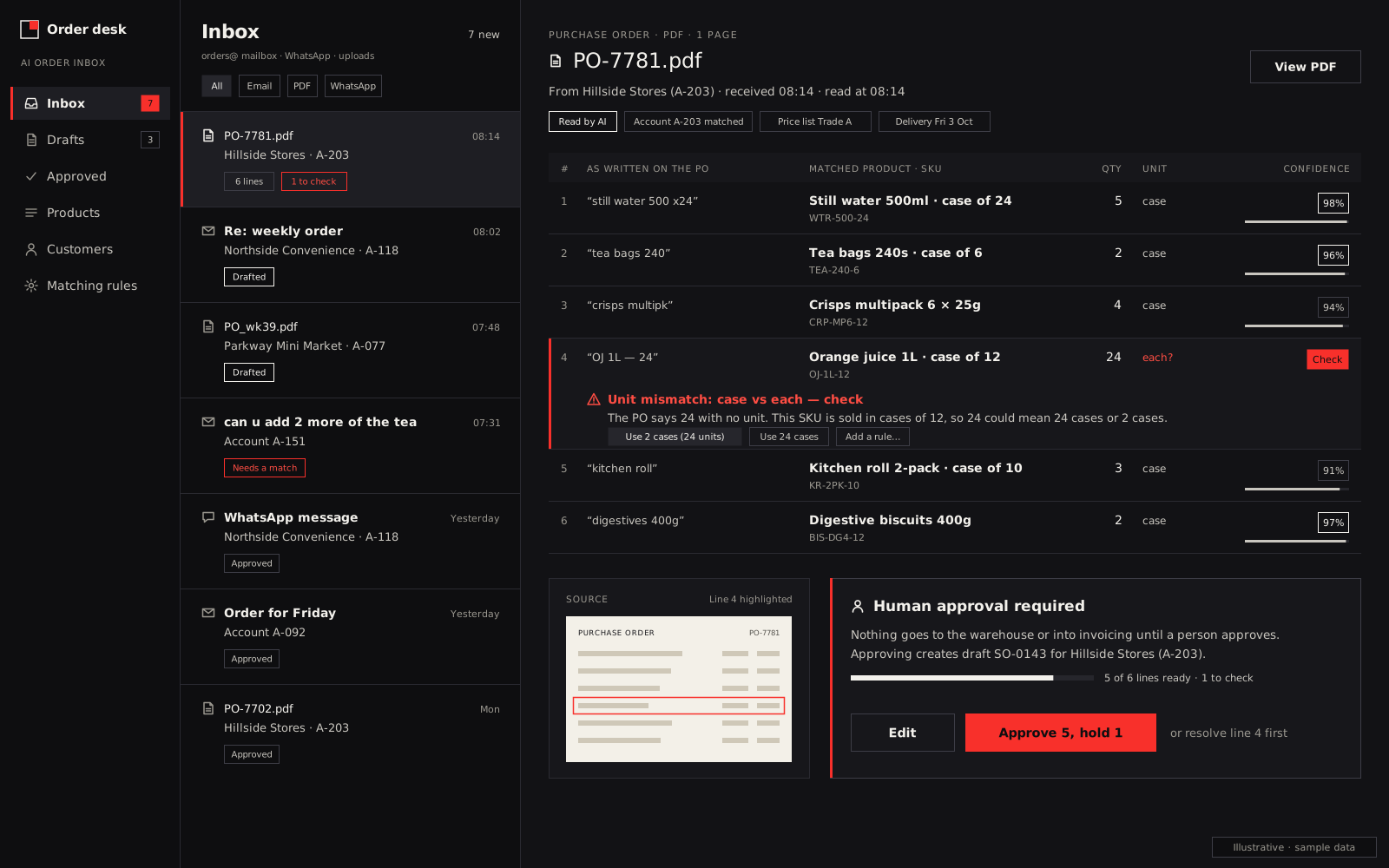
We set up small, specific automations and AI agents: the order or document inbox, invoice and statement runs, payment chasing, alerts, customer replies and the morning report. Each one replaces a job someone does by hand, and a person approves anything that touches money, stock or customers.
In short: start with the job your team repeats most often and gets wrong most expensively, usually an inbox someone retypes from, invoicing or payment chasing. Automate the reading, typing and reminding. Keep a person approving anything that changes money, stock or what a customer is told. Build it on n8n, Make or custom code, depending on volume, hosting and how close it sits to your core system.
This page is for businesses that run on an accounting system, a shared inbox, spreadsheets and WhatsApp, and have outgrown copy-paste. Wholesale and distribution is our strongest example: Coded Idea built its trade ordering software for that trade first, and our trade portal already runs sales and warehousing every day for a wholesaler. The same approach works for service firms, retailers and any team with repetitive admin.
What we automate
Each row is a separate automation. You don't need all of them, and we'd rarely build more than two or three at once. The first four are where wholesalers and distributors usually start.
| Job | Trigger | What the automation does | Approval step | Typical systems |
|---|---|---|---|---|
| Order inbox | Order email or PDF arrives | Drafts a sales order with lines matched to your codes | A person approves each draft | Gmail or Outlook, portal, accounting |
| WhatsApp requests | Customer sends a message | Reads the order or request and replies with a summary | A person confirms before anything is reserved | WhatsApp Business API, your system |
| Invoice runs | Order marked as dispatched, or job completed | Creates the invoice from what was actually delivered | Batch approved before sending | Xero, QuickBooks, Zoho Books, Sage |
| Stock alerts | Every morning | Lists lines below reorder point, slow sellers, short-dated batches | None: it only reports | Portal or stock system, email |
| Statements | First working day of the month | Sends each account its statement and overdue list | Batch approved before sending | Accounting system |
| Payment chasing | Invoice overdue by set days | Sends reminders, then creates a call task | A person approves any account hold | Accounting system, email, WhatsApp |
| Documents and forms | Supplier bill, application or form arrives | Reads it into a record and flags missing fields | A person checks flagged fields | Email, cloud storage, your system |
| Customer replies | "Where's my order?" or status email | Looks up the status and drafts the reply | A person sends, or status-only replies go automatically | Gmail or Outlook, your system |
| Morning report | Daily schedule | Yesterday's sales, margin by customer, overdue debt | None: it only reports | Your system, accounting |
The order inbox is the biggest of these, so it has its own page: AI order processing. If most orders arrive on WhatsApp, read WhatsApp ordering for wholesalers.
Is it worth automating? A rule of thumb
Before quoting, we run the same sum with every client:
Hours a year = times per week × minutes each time × 52 ÷ 60
Then add the cost of errors: how often the manual version goes wrong, times what each mistake costs you in credit notes, re-deliveries, refunds or lost goodwill.
Worked example, hypothetical figures: a credit controller sends 30 payment reminders a week at 4 minutes each. That's 120 minutes a week, 6,240 minutes a year, or 104 hours. If two invoices a month go out wrong and each costs about 40 in your currency to put right, that's another 960 a year.
Our rule: under about 50 hours a year, with cheap errors, a checklist or a feature you already pay for usually beats a build. Over a few hundred hours, or with expensive errors, automation tends to earn its keep quickly.
n8n, Make or custom code
We build with all three and aren't an official partner of either platform, so this is a plain comparison. Pricing models are taken from the n8n pricing page and the Make pricing page in September 2026.
| n8n | Make | Custom code | |
|---|---|---|---|
| Hosting | n8n's cloud, or the free Community Edition on your own server | Hosted by Make | Your server or cloud account, in the region you choose |
| Pricing model | Per workflow execution: one full run counts once, however many steps | Credits: each module action uses one credit | No platform fee; you pay for the build and hosting |
| Good for | Long workflows with AI steps, higher volumes, data kept on your server | Quick builds with many ready-made connectors | Logic inside your own system, strict money and stock rules |
| Watch out for | Self-hosting means someone patches, monitors and backs it up | Credit use grows with every step and every item looped over | Higher up-front cost; changes need a developer |
In practice, a few hundred runs a month with simple steps suits Make. Heavy daily volumes with AI steps usually point to self-hosted n8n. Anything that reserves stock or posts to your accounts from inside a portal we'd normally write as code. We build all three.
Human approval on money and stock
Our standing rules for every automation we build:
- Nothing posts an invoice, credit note or payment without a person approving it, at least until the numbers show it's reliable.
- Nothing reserves, moves or writes off stock on an AI reading alone.
- Account holds, price changes and credit limits are always a person's decision.
- Every automated action is logged with what triggered it and who approved it.
- There's an off switch, and your team knows where it is.
Details from the systems that change the design
A few facts from the tools themselves shape what we build, wherever you are:
- Built-in reminders come first. Xero can send up to five automatic invoice reminders, before or after the due date. Switch features like that on before paying anyone to rebuild them.
- Xero API costs for one business are low. A private integration for your own Xero organisation uses one connection, and Xero's developer pricing has a free Starter tier for up to five connections.
- Xero data can't train AI models. Xero's developer terms say data from its APIs may not be used to train AI or machine-learning models. We use it to read and act, never to train.
- WhatsApp replies are cheap; broadcasts aren't. Meta has charged per message since 1 July 2025, with rates set by message category and the customer's country. Replies inside the 24-hour window after a customer messages you are free; template messages you start are charged.
If you're in the UK
If you run Xero or Sage, we connect to both through their official APIs. Customer data the automation reads falls under UK GDPR, so the AI provider needs a processor contract, as we explain on the AI order processing page. For wholesalers there, our UK wholesale ordering software page shows how the automations fit around the trade portal.
What drives the cost
We don't publish a price list, because these factors move the number more than anything else:
- how many systems connect, and whether each has a usable API
- how messy the inputs are: typed emails, PDFs, photos, voice notes
- how many approval steps and users are involved
- hosting: self-hosted n8n, a platform subscription or your own cloud
- AI usage, billed by the provider per amount of text processed
- support after launch
You get a fixed quote after a 20-minute walkthrough, with the full cost known before work starts. Running costs such as AI usage and WhatsApp fees are listed separately.
How we start
Show us one job on a call: the inbox, the statement run, the chasing. We map the systems involved, agree a fixed plan and timeline, build, then stay close through the first weeks of real use. Our development team is in India, works across time zones, and you talk to the people building your automation. For bigger builds such as apps, portals or a full system, see custom software development.