

Guide + decision tool · QuickBooks and order handling
Does QuickBooks Online have sales orders? It depends on your plan
On this page8 sections
Short answer: yes, on QuickBooks Online Plus and Advanced, and no on the cheaper plans. Intuit's help article on sales orders says you can create them manually on Plus or Advanced. The UK pricing page lists sales orders, stock tracking and purchase orders under those two plans only. Sole Trader Plus, Simple Start and Essentials have estimates that convert into invoices, with no stock held in between. So the question most wholesalers are really asking is a different one: is upgrading enough, or do your orders need to live somewhere before QuickBooks sees them?
This guide works through that as a series of questions. Answer them in order, or use the decision tool halfway down.
Question 1: which plan are you on?
Your plan name is in your QuickBooks account settings. What you get depends on it.
Plus or Advanced: you already have sales orders. Here is what Intuit's help article says they do:
- A sales order is non-posting. It reserves items from inventory without touching your books.
- Saving one updates the item's committed quantity, so you can see what is promised before you reorder.
- It converts into an invoice when the order is ready, or into a purchase order when you need to buy the stock in.
- An estimate can be turned into a sales order, so a quote the customer accepts becomes an order without retyping.
- One sales order can link to several invoices, which is what you need when an order ships in parts.
- After conversion the status moves to Invoiced, then to Paid once the customer pays. The order's menu also offers Cancel order, Mark as shipped and Close order. Admins can see changes in the audit history.
Sole Trader Plus, Simple Start or Essentials: no sales orders. These plans have estimates ("convert estimates into invoices", in Intuit's wording), but the pricing page doesn't list stock tracking on them. That matters beyond orders. GOV.UK's guidance on company and accounting records says a limited company's records must include the stock it owns at the end of the financial year, the stocktakings used to work that figure out, and all goods bought and sold. If QuickBooks isn't tracking stock, that figure has to come from somewhere else you can show, such as a count sheet or a separate stock system. Those records are kept for 6 years from the end of the financial year they relate to.
Sole trader? Choosing a plan is also choosing your software for Making Tax Digital for Income Tax. GOV.UK's eligibility page sets the start dates by qualifying income: over £50,000 in 2024 to 2025 means you should have started from 6 April 2026; over £30,000 in 2025 to 2026 means from 6 April 2027; and over £20,000 in 2026 to 2027 means from 6 April 2028. Sales orders play no part in that, since MTD is about your records and returns, but it's a reason not to keep moving between systems.
Question 2: does the order need to exist before the invoice?
This is the real difference between a sales order and an invoice. A sales order is a record of what the customer has agreed to buy. An invoice is a demand for payment and, for a VAT-registered business, a tax document.
VAT Notice 700, paragraph 16.3.1, lists what a VAT invoice must show. That includes a sequential number, the time of supply (tax point), your VAT number, the customer's name and address, and the quantity, VAT rate and amount for each line. It also needs the total VAT in sterling and the unit price. A sales order needs none of that. It can be vague, change daily, and still be useful to the warehouse.
So the order needs to exist first if any of these are normal for you:
- Stock has to be held for a customer before you bill them.
- Orders change after the customer places them: more cases, a swapped line, "add it to Thursday's".
- Orders ship in parts, and you bill each part as it leaves.
- Someone checks credit before goods are picked.
If none of those apply, estimates and invoices on any plan will do, and you don't need sales orders at all.
Question 3: what happens when an invoiced order changes?
This is where shortcuts cost the most time. Once a VAT invoice has gone out, editing the order doesn't change the invoice. Paragraph 18.2.3 of VAT Notice 700 sets what a valid credit note must show. That includes its own number and date, what is being credited, the VAT credited in sterling, and the number and date of the original VAT invoice.
In practice that means:
- If you invoice when the order is placed, every change after that is a credit note or a supplementary invoice, each pointing back to the original.
- If you invoice when goods leave, changes before dispatch only touch the order, and there is nothing to correct.
QuickBooks Plus and Advanced make the second pattern possible, because one sales order can feed several invoices. On the lower plans you only get it by keeping the order somewhere other than QuickBooks until it ships.
Plus, Advanced, or an order layer? Answer four questions
Pick one answer per question. The tool updates as you go and tells you which route fits. It doesn't suggest prices, because those depend on your plan and your build.
Your answers go into the message for you. Add your name and email, and we reply by email with the route we'd take and why. Nothing is sent until you press send.
Question 4: what do QuickBooks sales orders leave to you?
Intuit's article covers creating, converting, editing and closing a sales order. It says nothing about how the order arrives or what happens to it in the warehouse. Before you rely on sales orders alone, check how your QuickBooks set-up handles each of these, on a trial with your own orders:
- Orders that arrive by email or from reps. A sales order still has to be created, by hand or by an app, so check who does that and how long it takes.
- A credit check before picking. Decide who looks at the account balance and when, because the sales order itself won't stop the warehouse.
- Pick lists and dispatch notes. Check what the warehouse works from and whether it matches the order.
- The invoice date and tax point. For goods, the basic tax point is usually the day they're sent or collected, but a VAT invoice issued up to 14 days after that makes the invoice date the tax point (VAT Notice 700, paragraphs 14.2.1 and 14.2.2). Check which date your converted invoice carries, because paragraph 16.3.1 asks you to show the time of supply.
- Order confirmations that quote the customer's PO number. Customers often match these against their own purchase orders.
If the answer to most of these is "a person does it", that's not a reason to leave QuickBooks. It's a reason to put the order somewhere that does those jobs, and let QuickBooks do the accounts.
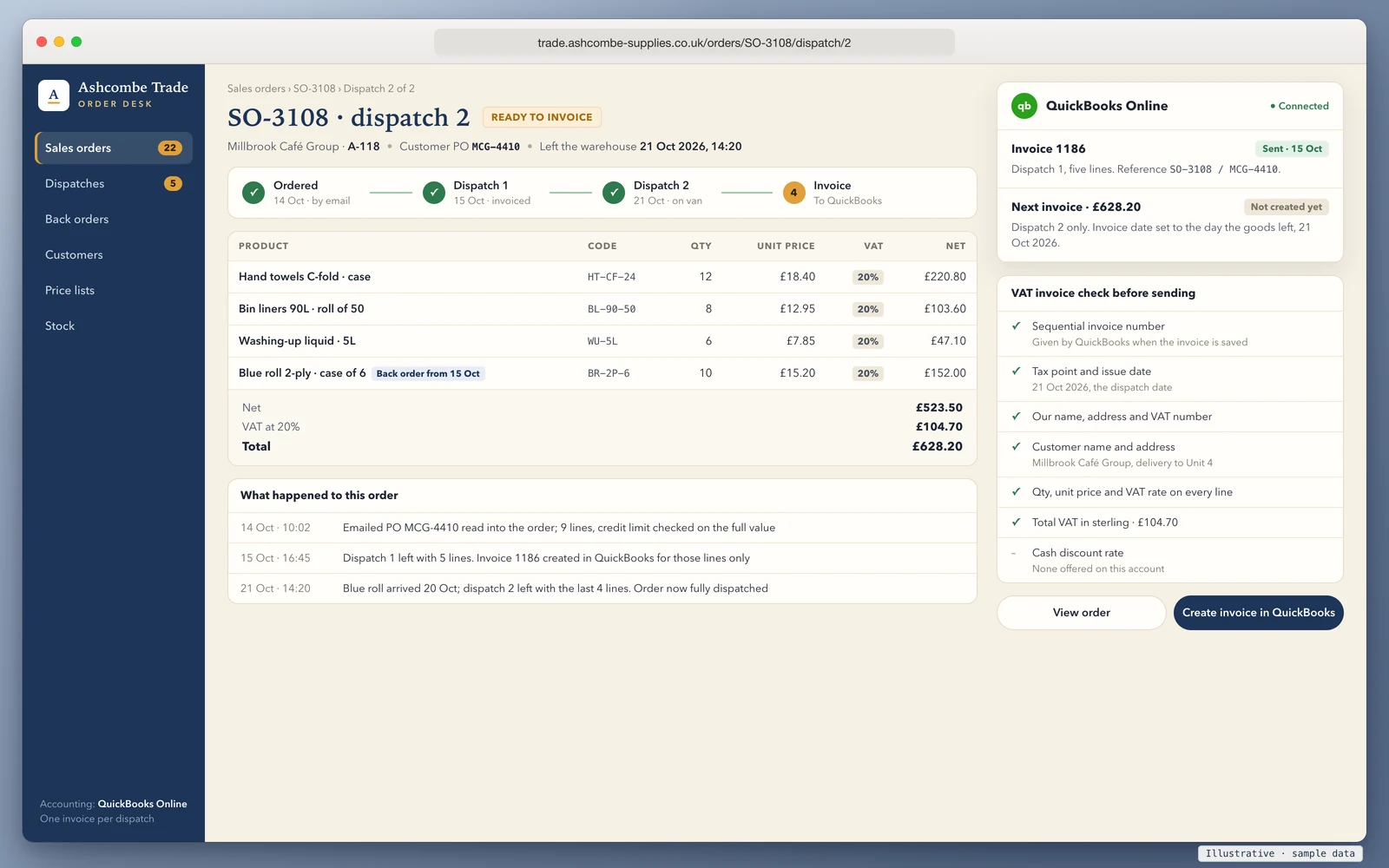
How the two set-ups compare
Sales orders inside QuickBooks (Plus or Advanced) suit a business where the people taking orders are the people using QuickBooks. You key the order, stock is committed, you convert it when goods leave, and everything is in one place. It's the cheapest change, and Intuit maintains it.
An order layer in front of QuickBooks suits a business where orders come from many places and the work before the invoice is the hard part. The order lives in a system built for picking, part shipments and credit checks. QuickBooks receives a finished invoice for each dispatch, so your accountant sees the same QuickBooks they always have.
We've written the same decision up for Xero, which works differently and has no sales order document on its standard plans. See does Xero have sales orders. If credit checks are part of your problem, the trade account application form guide covers what to collect before you give a customer terms.
How we'd approach it
We build order systems that sit in front of accounting software and connect to QuickBooks, Xero and Sage through their official APIs. You own the code and the data, with CSV export at any time. A trade portal we built covers sales and warehousing and is used every day by a UK wholesaler. Orders come in through a B2B ordering portal, or from emailed purchase orders through AI order processing.
It starts with a 20-minute walkthrough and a fit check of your products, customers, price lists and warehouses. After that we set up and import on a fixed plan and timeline, then train your team and stay close through the first weeks. You get a fixed quote after the walkthrough, with the full cost known before work starts and run costs listed separately. If the tool above says your plan's sales orders are enough, we'll tell you the same on the call.
Book a 20-minute walkthrough or send us one awkward order, such as one that shipped in parts or changed after you invoiced it. We'll show you where it would live and what QuickBooks would receive.
Sources
- Intuit QuickBooks UK, Create and manage sales orders: plans, non-posting, committed quantity, conversion, editing and actions (accessed 22 October 2026)
- Intuit QuickBooks UK, Pricing: plan names and which plans list sales orders, inventory, purchase orders and estimates (accessed 22 October 2026)
- HMRC, VAT guide (VAT Notice 700), paragraphs 14.2.1, 14.2.2, 16.3.1 and 18.2.3
- GOV.UK, Running a limited company: company and accounting records
- HMRC, Check if you're eligible for Making Tax Digital for Income Tax (updated 26 March 2026)
Last reviewed 22 October 2026. Intuit changes plans and features; check the pages above on the day you decide. This guide isn't tax or accounting advice.