

Guide + form builder · Opening trade accounts
Trade account application form: what to ask, why, and how to check the answers
On this page10 sections
Short answer: a trade account application form needs fewer fields than most templates suggest, and every field should earn its place by feeding a check or a decision. The core of every form is: legal name and trading name, business type, company number (companies only), VAT number (VAT-registered businesses only), invoice address, and a named contact. Credit terms, delivery sites, portal users and marketing consent are added only when you actually offer them. Two checks are free and take minutes: HMRC's VAT number check and the Companies House register. Use the builder below to get the field list for how you trade.
From our side
Before we put any field on a trade account form, I ask what someone will do with the answer. If nobody checks it or uses it, it comes off. The short forms we build ask for less, and the checks behind them get done every time instead of when someone remembers.
— Avi Singh, Founder
Build your form: tick how you trade
Tick each thing that's true of your business. The list underneath grows with the fields each one needs, so you end up with a form that asks for what you'll use and nothing more.
Your ticks and field list go into the message for you. Add your name and email, and we reply by email with anything we'd add or drop. Nothing is sent until you press send.
This runs in your browser. Nothing you tick is sent anywhere unless you choose to send it.
Every field, why you ask, and how you check it
Most downloadable templates copy each other's fields. Before you keep a field, write down what you'll do with the answer. If nothing, drop it.
| Field | Why you ask | How you check it |
|---|---|---|
| Legal name | It goes on invoices and any contract | Match it to the VAT check result or the Companies House record |
| Trading name | Orders and emails often arrive under it | Keep it as an alias on the account, not instead of the legal name |
| Business type | Decides which of the next two fields apply | Ask first, then show only the fields that fit |
| Company number | Finds the right company on the register | Companies House: status, officers, insolvency entries |
| VAT number | Confirms a VAT-registered business and its address | HMRC's Check a UK VAT number service |
| Invoice address | Where invoices and statements go | Compare with the VAT and register addresses; ask about differences |
| Named contact | Who to call about orders and account questions | Call back on a number you found yourself, not one from the form |
| Credit limit and terms | Sets what the customer can owe and when it's due | Your own credit policy decides; record who approved it |
Two fields are worth leaving off unless you have a use for them: bank details (you don't need them to invoice someone; collect them later if you set up direct debits) and long lists of trade references that nobody has time to phone.
Branch the form by business type
A single fixed form fails the customers you'd most like to keep simple. The fix is one question near the top: what kind of business are you?
- Limited company or LLP. Ask for the company number. It's the key to the free register check below.
- Sole trader or ordinary partnership. GOV.UK sets these up by registering for Self Assessment with HMRC or registering the partnership with HMRC, not as a company, so there's no company number to ask for. Ask for the owner's or partners' names and the trading address instead.
The VAT number needs its own branch. A business only has to register for VAT once its taxable turnover over the last 12 months goes above £90,000, so plenty of genuine trade customers don't have one. Ask "are you VAT-registered?" first, then require the number only on a yes.
Two free checks you can run the same day
The VAT number check. HMRC's Check a UK VAT number service tells you whether a number is valid and gives the name and address it's registered to. You need the number itself; the service won't search by business name. If you're VAT-registered, you can enter your own VAT number as well and get proof of when you made the check, which is worth saving against the account. EU VAT numbers go through the EU's VIES service, which the same GOV.UK page links to.
What to compare: the name and address that come back against the legal name and invoice address on the form. A trading name on the form and a different legal name in the result is normal. A completely different business is not.
The Companies House check. The Companies House register is free to search and shows company status, current and resigned officers, disqualified directors, filings, charges and insolvency information. For a new trade account, three things matter most: is the company active, is the person signing your form listed as an officer, and are there insolvency entries? While you're there, the free Follow service sends email alerts when a company you follow has a filing accepted. For customers on credit, that's an early sign of change you'd otherwise miss.
Keep the result in proportion. Companies House warns that occasional inaccuracies can occur and says it can't take responsibility for the consequences of errors or omissions. A clean record shows the company exists and who runs it. It doesn't prove that the person filling in your form works there, which is why the contact check in the table above uses a number you found yourself.
Credit terms: put them on the form, not in a later email
If you offer credit, the application is where the customer sees your terms and accepts them. GOV.UK's guide to late commercial payments sets out the defaults that apply when nothing else is agreed:
| What GOV.UK says | Detail |
|---|---|
| No payment date agreed | Payment is late 30 days after the customer gets the invoice or you deliver, whichever is later |
| Agreed payment date | Usually within 60 days for business transactions; a longer period is allowed if fair to both sides |
| Statutory interest | 8% plus the Bank of England base rate for business-to-business transactions, unless your contract sets a different rate |
| Fixed recovery sum | £40 on debts up to £999.99, £70 from £1,000 to £9,999.99, £100 from £10,000 |
That table describes the defaults; it isn't advice on what your terms should say. What matters for the form is the record. Show the terms, or a link to the version in force, beside the signature or submit button. Save which version the customer accepted, when, and who accepted it. The day a payment runs late, nobody should be searching old emails for which terms applied.
The credit limit itself is your decision. The form should capture the amount the customer asks for; the account record should hold the amount you approved, who approved it and when.
The privacy part most templates leave out
A trade account form collects personal data even when every applicant is a company. The ICO's business-to-business marketing guidance says the name and number of a business contact is personal data, even when that person is acting in a business capacity. Three things follow for the form:
- Give privacy information at the point of collection. Under the right to be informed, it has to be provided when you collect the data. The ICO's list of what to provide includes your purposes, lawful basis, who you share the data with, how long you keep it, and the person's rights. A link beside the submit button does this; a footer link people never open doesn't help much.
- Name who else sees the data. If any check involves sending the applicant's details to someone else, that recipient belongs in your privacy information. Write it once, accurately, rather than adding vague catch-all wording.
- Keep marketing consent separate and unticked. The ICO says sole traders and some partnerships are "individual subscribers" for email marketing rules, so you generally need their consent unless the soft opt-in applies. Companies and LLPs are corporate subscribers, where that rule doesn't apply, but the named contact is still personal data. One unticked box, worded plainly, covers both.
From paper form to an account that's ready to order
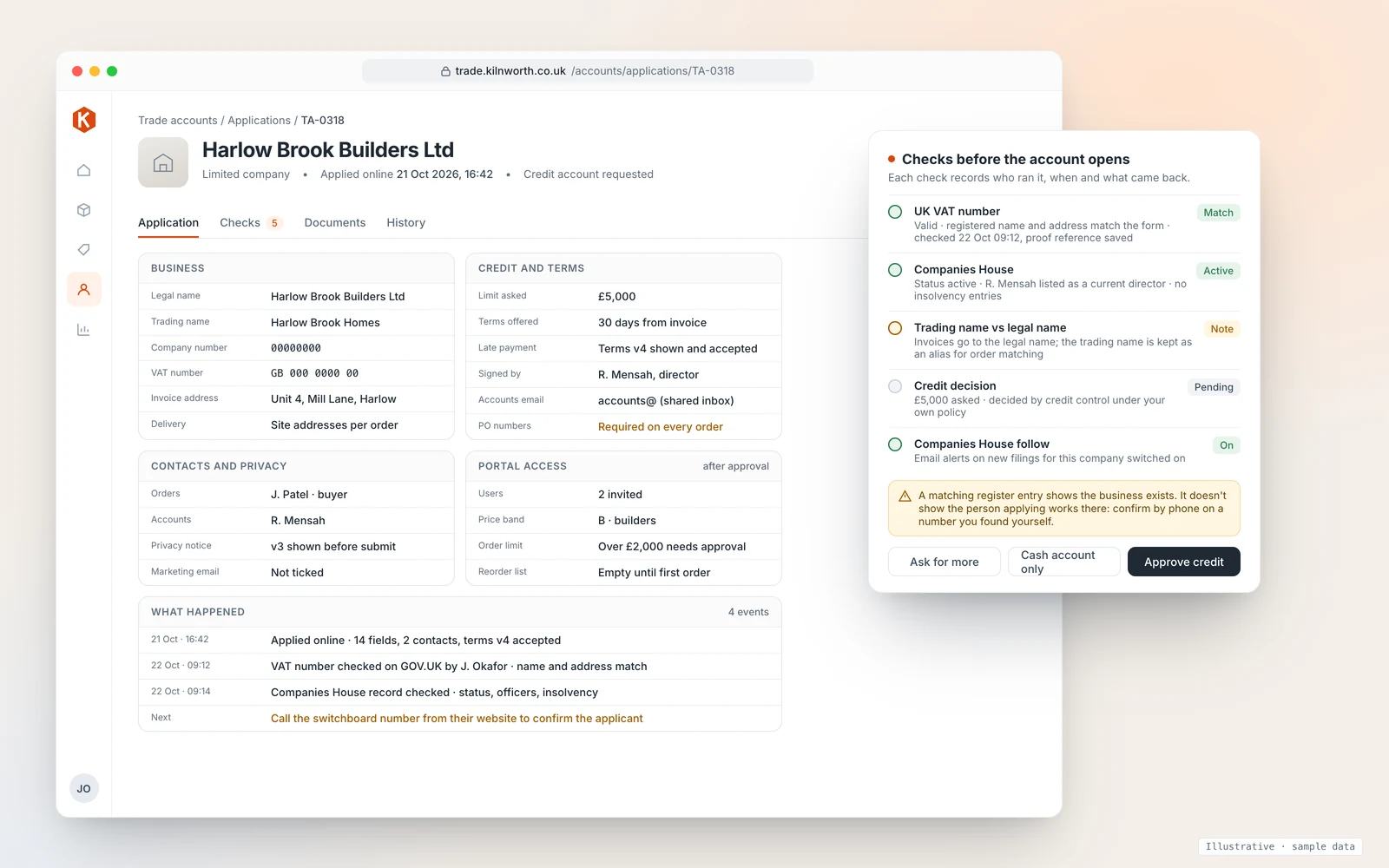
The form is the start of the job, not the job. With a paper or PDF form, the slow part is what happens after it arrives: someone retypes it into the accounting system, checks the VAT number when they remember, and emails the customer a price list by hand. Each step is small. Together they explain why a new account can take days to place its first order.
An online form linked to your ordering system closes that gap. The application arrives as a record rather than a PDF, the checks are logged against it, and approval opens the account with the right price band and portal users in one step. That's what the screen above shows. We build trade portals that work this way; one we built covers sales and warehousing and is used every day by a UK wholesaler. We connect it to accounting systems such as Xero, Sage and QuickBooks through their official APIs, and you own the code and data, with CSV export any time.
If you sell licensed or age-restricted goods, the extra fields are covered in our guide to vape retail licensing and trade-account records. For what the whole ordering side costs, see the B2B ordering portal cost guide, and for how accounts, price bands and reorders work once a customer is approved, see our B2B ordering portal page. If you run a builders merchant or a food and drink wholesale business, see what we build for building supplies and food and drink distributors.
How we'd approach yours
We start with a 20-minute walkthrough of how an account gets opened today, then a fit check of your customer types, price bands and approval steps, and only then a fixed plan and timeline. You get a fixed quote with the full cost known before work starts. If a better PDF form and a written checklist would do the job, we'll say so.
Book a 20-minute walkthrough or send us your current form and we'll mark up what we'd add, drop or check.
Sources
- HMRC, Check a UK VAT number
- HMRC, VAT registration: when to register (£90,000 threshold)
- Companies House, Searching the Companies House register (updated 9 June 2026): free details, Follow alerts, accuracy disclaimer
- GOV.UK, Set up as a sole trader and Set up a business partnership
- GOV.UK, Late commercial payments: charging interest and debt recovery, including charging interest and claiming debt recovery costs
- ICO, The right to be informed and What privacy information should we provide?
- ICO, Business-to-business marketing
Last reviewed 22 October 2026. This guide explains what the official services and guidance say; it isn't legal advice. Check your own terms and privacy notice with an adviser.