

Guide + template builder · Trade pricing
Wholesale price list template: the columns that matter, and when a spreadsheet stops working
On this page9 sections
Short answer: a wholesale price list needs seven columns before anything else: product code, description, unit of sale, units per case, price per unit excluding VAT, the VAT rate for that line, and the date the price takes effect. Add band prices, volume breaks, barcodes, RRP or an image column only when the way you sell needs them. Most templates you can download skip the VAT rate and the effective date, and those are the two columns that settle disputes later. Use the builder below to get the column list and a header row you can paste into Excel or Google Sheets.
From our side
When a wholesaler sends us their price list, the sheet itself is rarely the problem. The problem is the deals that aren't on it: prices agreed on the phone, a promotion someone forgot to end, a rep still carrying last month's PDF. I always ask where those live before we talk about any software, because that answer decides whether a tidier spreadsheet is enough.
— Avi Singh, Founder
Build your template: tick how you sell
Tick each thing that's true of your trade customers. The column list grows with what each one needs, and the meter shows how much a single spreadsheet will have to keep in step.
Your ticks and column list go into the message for you. Add your name and email, and we reply by email with anything we'd add or drop. Nothing is sent until you press send.
This runs in your browser. Nothing you tick is sent anywhere unless you choose to send it.
Every column, why it's there, and what goes wrong without it
Downloadable templates tend to give you a product name, a price and a discount column. That's enough for a quote, not for a list customers order from every week.
| Column | Why it's there | What goes wrong without it |
|---|---|---|
| Product code | The one thing that never changes when a description is reworded | Orders quote "the 25 kg one" and staff guess |
| Description | What the customer reads | Fine on its own, but two similar items get confused without the code |
| Unit of sale | Says whether the price is per each, box, bag or case | A box price gets read as a single-item price |
| Units per case | Lets a buyer work out a case cost and order in whole cases | Split cases, or a reorder of 12 when they meant 12 cases |
| Price per unit, ex VAT | The trade price for that unit | Mixed gross and net prices on one sheet |
| VAT rate | The rate for that line | A wrong rate on the invoice when a zero- or reduced-rate line is added |
| Price effective from | Which list was in force on an order date | Arguments over an invoice months later, with no way to settle them |
| Band prices | One column per band, if bands exist | One customer sees another band's prices |
| Unit and case barcode | For customers who scan goods in | Goods-in at the customer's end fails to match the delivery |
| RRP | A guide price for retailers | Retailers ask for it by email, one product at a time |
Two layout rules make the sheet work for years. First, one row per thing a customer can order. If a single and a case of 12 are both sold, they get two rows and two codes, not one row with two prices. Second, no merged cells, no prices typed into descriptions, no colour as data. A sheet laid out this way can be filtered, exported as CSV and imported into an accounting or ordering system later without retyping.
Prices ex VAT, with the rate on every line
Trade lists normally show prices excluding VAT. That isn't just habit. GOV.UK's Price Marking Order guidance says the order is limited to sales between traders and consumers, and the selling price it describes includes VAT and all other taxes. The same guidance covers unit pricing (per kg or litre) for products sold from bulk. So if your list is open to the public, for example at a cash and carry counter or on an open website, it needs the VAT-inclusive price as well, and in some cases a unit price. That's why the builder adds those columns when you tick that box.
The VAT rate column matters for a different reason. HMRC's record-keeping notice (VAT Notice 700/21, section 4.1) says a full VAT invoice shows, for each line, the quantity, the rate of VAT and the amount payable excluding VAT, plus the unit price. Whoever turns your price list into invoices needs the rate for each product, not a note at the bottom saying "all prices plus VAT".
UK VAT rates are 20% standard, 5% reduced and 0% zero rate. GOV.UK keeps a list of which rate applies to which goods, and notes that some rates only apply when certain conditions are met. A food wholesaler, for example, can easily have zero-rated and standard-rated lines on the same list. Look each product up once, put the rate in the column, and the question never comes up again.
Discounts: show the price the customer actually pays
Discount columns ("10% off over 50 units") look tidy but push the sums onto the customer and your own staff. HMRC's VAT guide (Notice 700, section 7.3.2) says that where an unconditional discount is given, VAT is due on the discounted amount, and for prompt payment discounts the tax value is based on the amount actually paid. In practice that means two things for the list:
- Put the net price at the break, not a percentage. "Price at 50+: £x" is easier to check against an invoice than "10% off", and it's the figure VAT is worked out on.
- Keep conditional deals off the main list. A deal one customer earns, or one that ends on a date, belongs on its own tab with the account, product, price and end date. That's what the builder's "account deals" line does.
Pictures, versions and sending the list
"With pictures." Embedding images in spreadsheet cells is the most common request and the most common reason a price list gets too heavy to email. Keep an image column holding a file name or link, and produce a PDF or catalogue from the sheet when customers want pictures. The sheet stays the single source of prices; the pictures follow it.
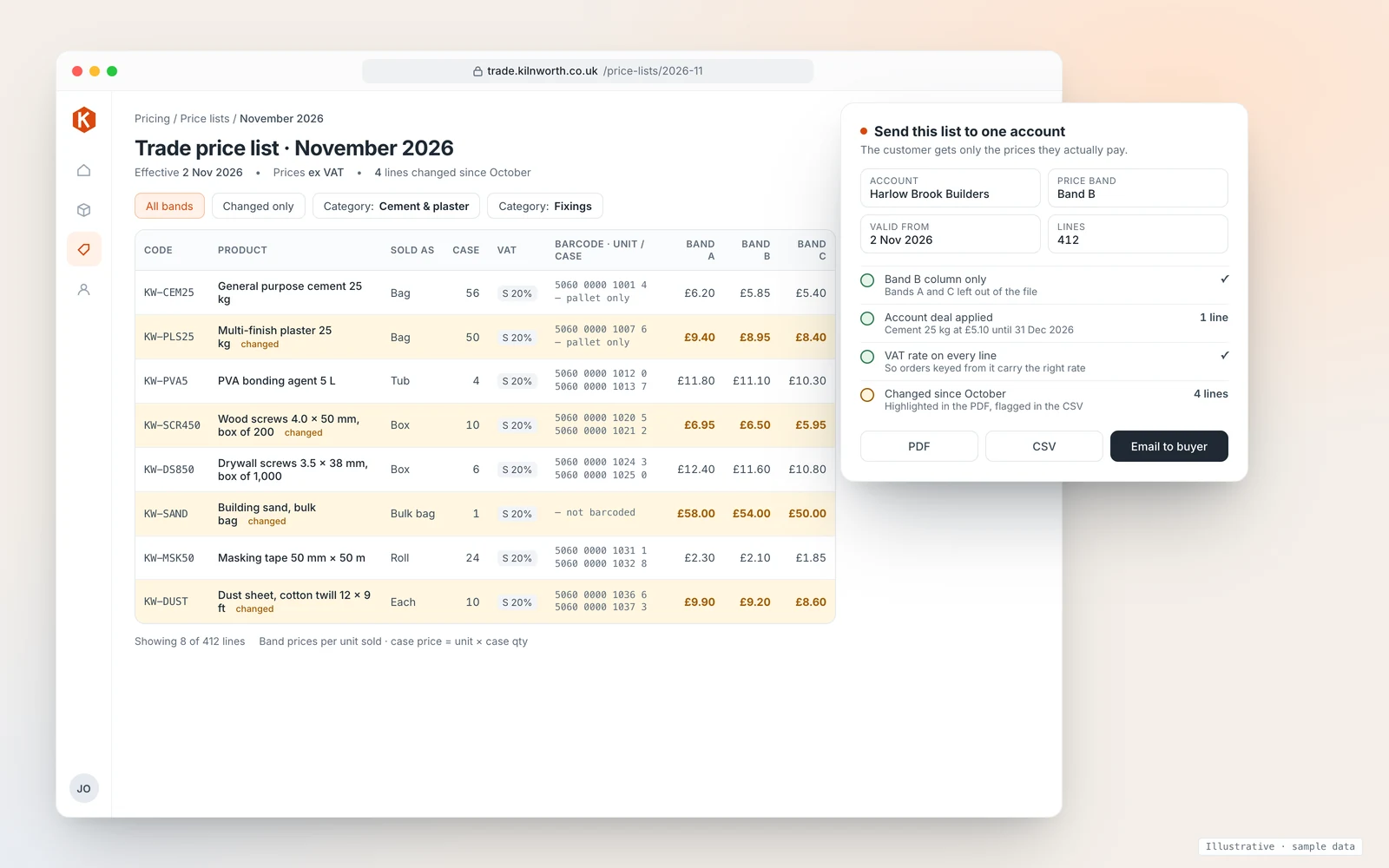
Versions. Never edit last month's list. Save a new version, put the effective date at the top and in the column, and mark the lines that changed. Customers can see what moved without reading every row, and you can show which prices applied to any past order.
Sending. Send each customer only their own band. A file with every band in it will be forwarded sooner or later. If you keep bands in columns, hide or delete the others before exporting, or produce one file per band.
When a spreadsheet stops working
A price list spreadsheet works well while there is roughly one price per product per customer group. It starts to fail when the price a customer pays depends on several things at once. These are the signs we look for:
- Deals agreed outside the list. Phone and email deals that live in someone's inbox, so the invoice goes out at the band price and the customer queries it.
- Promotions nobody switches off. A promo price still on the sheet a month after it ended.
- More than one current version. Reps carrying last month's PDF, the office working from this month's sheet.
- Prices retyped into the accounts system. Every retype is a chance for a wrong price on an invoice.
None of those are fixed by a better template. They're fixed by keeping prices in one place that works out the right price for each account at the moment the order is placed, which is what a trade ordering portal does. We build portals like that; one we built covers sales and warehousing and is used every day by a UK wholesaler. We connect to accounting systems such as Xero, Sage and QuickBooks through their official APIs, and you own the code and data, with CSV export any time. Your existing price list spreadsheet becomes the import file, which is another reason to lay it out properly now.
For what a portal costs over three years, and a tool that counts the prices on one product, see our B2B ordering portal cost guide. How bands, accounts and reorders work once prices are in one place is on our B2B ordering portal page. If you're setting up new trade customers at the same time, our trade account application form guide covers the fields and checks, and if your accounts run on Xero, see how sales orders work with Xero.
How we'd approach yours
We start with a 20-minute walkthrough of your price list and the deals that live outside it, then a fit check of your products, customers, price bands and warehouses, and only then a fixed plan and timeline. You get a fixed quote with the full cost known before work starts. If a better-laid-out spreadsheet is all you need, we'll tell you.
Book a 20-minute walkthrough or send us your current price list and we'll mark up the columns we'd add, drop or move to their own tab.
Sources
- GOV.UK, Price Marking Order 2004: government guidance: scope limited to sales between traders and consumers; selling price includes VAT; unit pricing for products sold from bulk
- HMRC, Record keeping for VAT (VAT Notice 700/21), section 4.1 (last updated 18 March 2024): details a VAT invoice must show
- HMRC, VAT guide (VAT Notice 700), section 7.3 (last updated 25 June 2026): VAT fractions and discounts
- GOV.UK, VAT rates and VAT rates on different goods and services
Last reviewed 28 October 2026. This guide explains what the official guidance says; it isn't tax or legal advice. Check the VAT rate for your own products with HMRC or an adviser.