

Guide · UAE e-invoicing
UAE e-invoicing sandbox and ASP test plan: the 12 invoices to run before go-live
On this page7 sections
Short answer: the Ministry of Finance tells you to test six things with your Accredited Service Provider (ASP) before going live, from sending invoice data to the ASP through to the confirmation that the tax data reached the Federal Tax Authority (FTA). It doesn't give you a list of invoices to test with. This page does: 12 test cases that cover the documents and failures a UAE B2B business really produces, plus a checker that tells you how ready you are. We found no Ministry-run sandbox in the published documents, so the test environment you use is the one your ASP provides.
If you haven't chosen an ASP yet, start with how to choose an ASP and then come back here. If you have, this is what to run before you sign off the integration. The dates that decide how much time you have are in our ERP integration guide: businesses with revenue of AED 50 million or more go live on 1 January 2027, and everyone else on 1 July 2027 (government entities on 1 October 2027).
What the Ministry says to test
UAE Electronic Invoicing Guidelines, Version 2.0 (26 October 2026), Appendix 1, step 3, says you must agree with your ASP how invoice data will be shared, how you will receive confirmation messages and how you will receive suppliers' invoices. It then says to have enough time to test:
- Sending the invoice data to the ASP.
- The ASP issuing the invoice to the buyer.
- You receiving the ASP's confirmation of success or failure of the exchange.
- You receiving an e-invoice from the ASP that a supplier issued.
- The ASP reporting the tax data to the FTA.
- You receiving the ASP's confirmation of success or failure of that reporting.
That is a flow, not a test script. Two things follow. First, "it worked once" proves item 1 for one kind of invoice. Second, accreditation tests the ASP, not you: under Ministerial Decision No. 168 of 2026 (Article 12) a provider completes Peppol interoperability and tax data reporting tests before it is accredited. Whether your own data passes is still yours to prove.
The 12 test cases
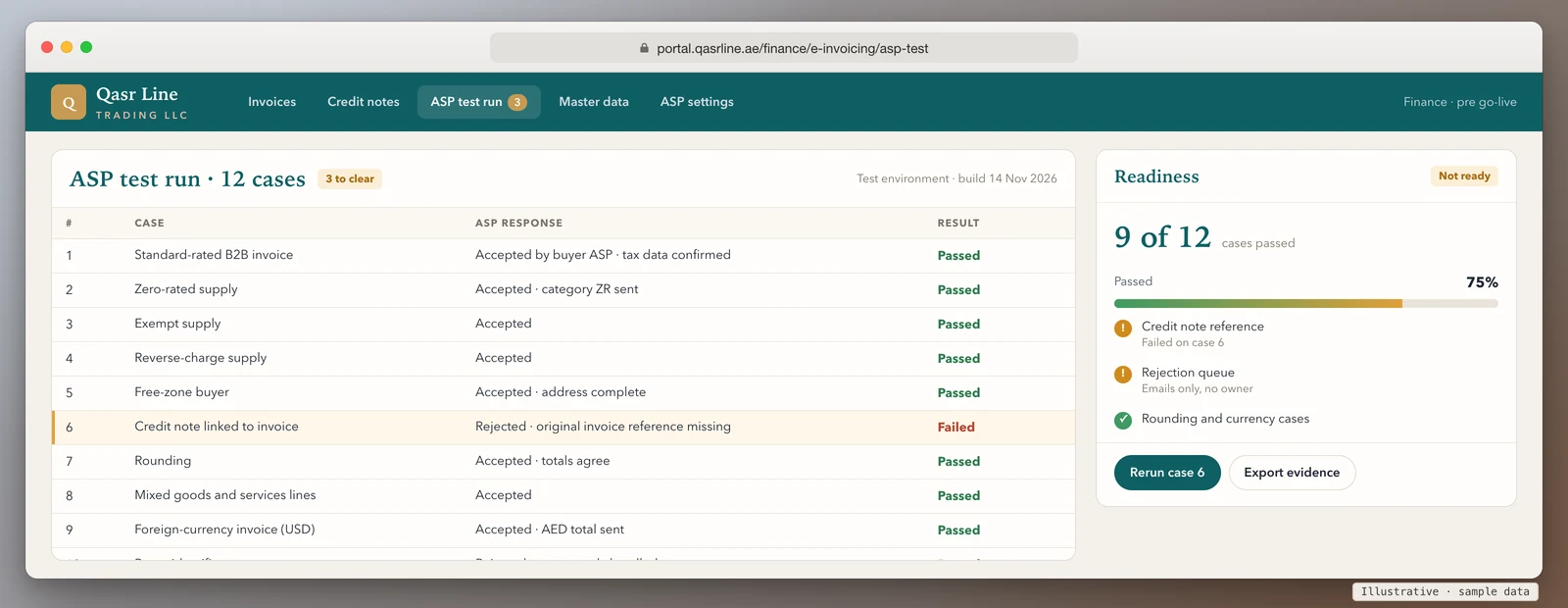
Run each case with a real-looking document from your own system, not a hand-typed sample. For every case the pass mark is the same: the invoice reaches the ASP, the ASP's response comes back into your system, and you can say which document it belongs to.
| # | Case | What you are proving |
|---|---|---|
| 1 | Standard-rated B2B invoice | The basic path works: your data, the ASP, the buyer's side and the confirmations |
| 2 | Zero-rated supply | Your system sends the right tax category, not a blank or a standard rate |
| 3 | Exempt supply | Exempt lines are described correctly. The Guidelines note the TRN isn't mandatory on exempt and out-of-scope transactions |
| 4 | Reverse-charge supply | The treatment survives the trip from your system to the ASP's format |
| 5 | Buyer or seller in a free zone | Party details and addresses are complete. Check the scope question with the FTA or your tax adviser, not with us |
| 6 | Credit note linked to an invoice | The credit note carries the reference to the original. A partial credit note and one that references several invoices are both allowed, so test the one you actually issue |
| 7 | Rounding | Totals agree to the fils. The Guidelines apply rounding at invoice level to 2 decimals, not at line or tax-category level, so a system that rounds per line may fail |
| 8 | Mixed lines | Goods, services and several VAT categories on one invoice, with the right item type on each line |
| 9 | Foreign-currency invoice | The AED gross amount is sent in the tax accounting currency field, as the Guidelines require when the document currency isn't AED |
| 10 | A buyer problem | A wrong or missing buyer identifier. Peppol IDs are 0235 followed by the 10-digit TIN, so test what happens when yours is wrong |
| 11 | A deliberate rejection | You break one mandatory field on purpose and watch where the rejection lands, who sees it and how it gets resent |
| 12 | Received supplier invoice, then archive retrieval | A supplier's e-invoice arrives through the ASP and reaches your accounts. Then you pull a month-old invoice and its confirmations out of the archive |
Cases 10 and 11 matter most, and teams skip them because they only test success. The Guidelines' description of the flow says that if the buyer's side fails to validate an invoice, the failure is confirmed back to the sender and no tax data is reported by the buyer's ASP. A rejected invoice is therefore not a delivered one. Under Cabinet Decision No. 173 of 2026, AED 100 is charged for each e-invoice not issued and sent through the system, so you want to know in advance who will see a rejection and how fast.
What to ask the ASP before you start
The Ministry's Considerations for selecting an ASP (Version 1.1, 28 October 2026) lists questions to ask, including how the ASP integrates with your ERP, how it supports record retention and what it charges. Before testing, add four of your own and get the answers in writing:
- Is there a test environment, and is it the same code as production?
- Do test documents count towards the 100 free e-invoices?
- How do rejections reach us: a webhook, a status you poll, a file or an email?
- How long do you hold our invoices, and how do we retrieve them? The Guidelines (section 5.4) require records to be kept for 5 years following the tax period and be producible to the FTA.
If your answer to the third question is "an email", build the queue before you test case 11.
Check how ready you are
Tick every case you have passed end to end in your ASP's test environment: the document went out, the response came back into your system and you could see it. Don't tick a case you have only discussed. The result is an estimate for planning, not an assessment of your compliance.
Your ticks go into the message for you. Add your name and email, and we reply by email with where the gaps usually sit. Nothing is sent until you press send.
This runs in your browser. Nothing you tick is sent anywhere unless you choose to send it.
Keep the evidence
The 12 cases are only useful if you can show them later. For each one, store the document number, the date and time sent, the ASP's response and who signed it off. That is the same record that answers the questions behind the penalty table. It also tells you what changed if a case that passed in November fails in March after an ERP update or a change to the invoice format. If you run Odoo, SAP Business One or Zoho Books, see what each vendor gives you in our ERP vendor guide before you write the test plan.
How we help
We're a software company with a development team in India, and we work with UAE businesses remotely. We aren't an Accredited Service Provider, a tax adviser or a partner of any ASP. We build: we change your billing system, ERP or ordering portal so it sends invoices and credit notes to the ASP you chose, brings the ASP's responses back, and puts rejections in a queue someone owns. If your system can't be changed, we build the layer between it and the ASP.
You get a fixed quote after a 20-minute call, so the full cost is known before work starts. Book a call or ask for a price.
Sources
- Ministry of Finance, UAE Electronic Invoicing Guidelines, Version 2.0 (26 October 2026; read 8 November 2026): section 5.4, Appendix 1 step 3, constraints on rounding, credit notes and currency
- Ministry of Finance, Considerations for selecting an Accredited Service Provider, Version 1.1 (28 October 2026; read 8 November 2026)
- Ministerial Decision No. 168 of 2026 on eligibility criteria and accreditation procedure (Article 12 testing; 100 free e-invoices a year per end user)
- Cabinet Decision No. 173 of 2026 as summarised in our penalties guide
- Ministry of Finance, eInvoicing documents page
Last reviewed 8 November 2026. This guide explains published rules and the Ministry's guidance and isn't legal or tax advice. We have not tested any named ASP's environment.