

Guide + form checker · Taking trade orders
Wholesale order form template: the fields that get an order keyed without a phone call
On this page9 sections
Short answer: a wholesale order form works when your office can enter the order without calling the customer back. That needs four groups of fields: who is ordering (account number, person placing it), where and when (delivery address or site, requested date, access notes), the lines (product code, unit of sale and quantity on every line), and the rules (the customer's PO number, whether substitutes are allowed, and whether to part-ship or hold an order when something is out of stock). Most free templates collect a name, an email and a product list, and skip the last group, which is where most follow-up calls come from. If you trade as a limited company, UK law also puts your registered number, registered office and place of registration on your order forms. Use the checker below to test the form you use now, then copy the layout or download the CSV.
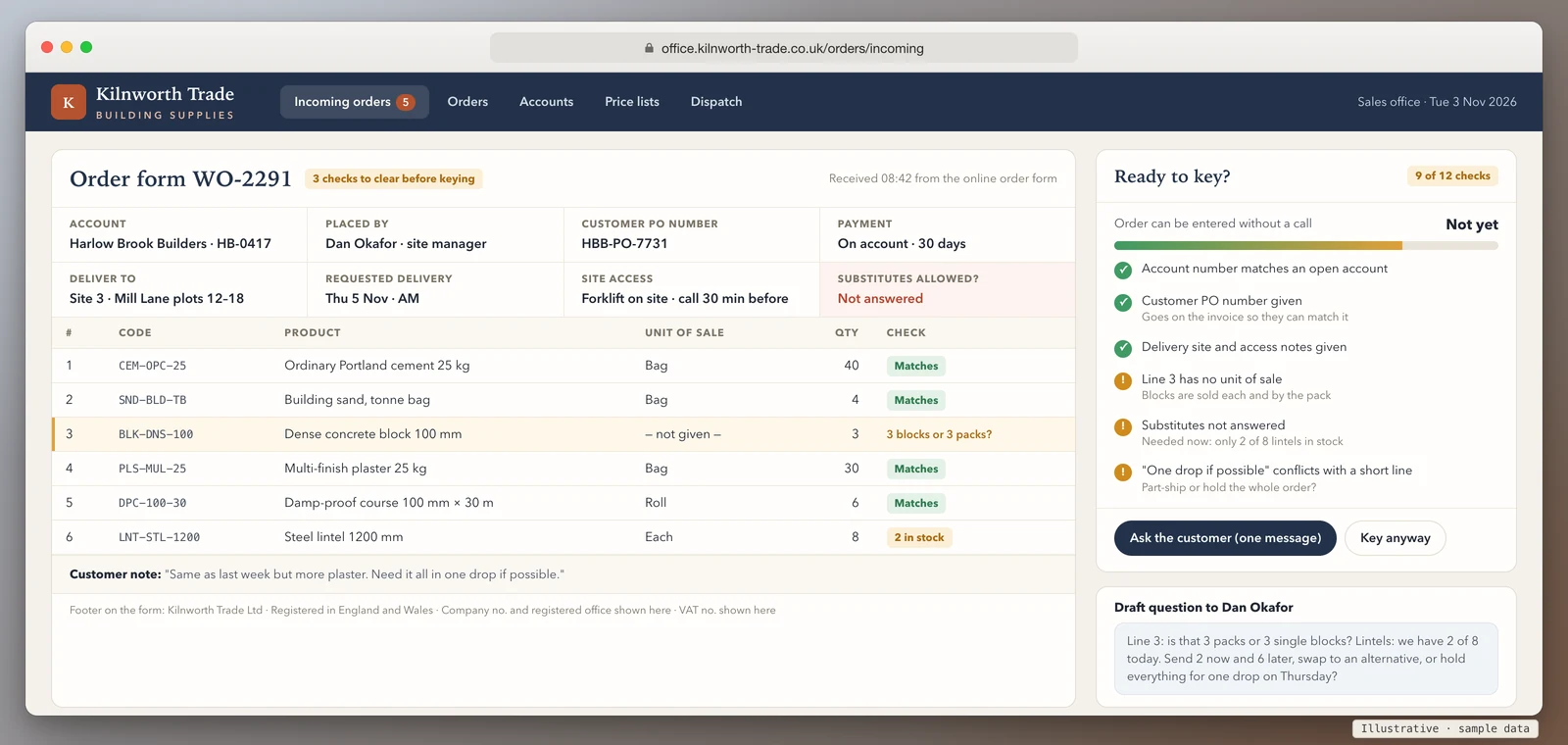
Test your current order form: will it need a phone call?
Tick each thing your order form asks for today, whether it's paper, a PDF, a spreadsheet or a web form. The meter shows how likely an order is to land complete, and the list shows the call each missing field causes.
The layout is all 12 fields, grouped as above, ready to paste into a document or form builder. The CSV is the order-lines table for Excel or Google Sheets.
Your ticks and the missing fields go into the message for you. Add your name and email, and we reply by email with what we'd change on your form. Nothing is sent until you press send.
This runs in your browser. Nothing you tick is sent anywhere unless you choose to send it.
The template, field by field, and the call each one saves
Every field on a trade order form should earn its place by answering a question your office would otherwise have to ask. This is the full layout the checker copies for you.
| Group | Field | Why it's there | The call it saves |
|---|---|---|---|
| Who | Account number | Two branches or two customers can share a trading name | "Which account is this for?" |
| Who | Placed by, with phone | Orders get queried by the person who knows the site | "Who can we ask about line 4?" |
| Where and when | Deliver to | Builders, caterers and chains order to more than one address | "Yard, shop or site?" |
| Where and when | Requested date | "ASAP" means different things to each customer | "When do you actually need it?" |
| Where and when | Access notes | Lorry access, forklifts, opening hours, call-ahead | Failed deliveries, not calls |
| Lines | Product code | Descriptions get reworded; codes don't | "Which one did you mean?" |
| Lines | Unit of sale | The single most common mix-up in trade orders | "Is 3 three items or three cases?" |
| Lines | Quantity | Whole units of sale only | Split cases nobody wanted |
| Rules | Customer PO number | Their accounts team matches invoices to POs | Unpaid invoices, weeks later |
| Rules | Substitutes allowed | Out-of-stock lines need a decision | "Can we send the alternative?" |
| Rules | Part-ship or hold | Some customers want one drop, others want what's ready | "Send now or wait?" |
| Rules | Payment | On account or pay before dispatch | Orders held at dispatch |
Two layout rules keep it working. First, one line per product code, with the unit of sale written next to the quantity, never inside the description. Second, fixed choices wherever there's a decision: substitutes yes, no or ask; part-ship or hold. Free-text boxes for these get "see note" or nothing at all. The unit-of-sale column only works if your wholesale price list uses the same units, so set that up first if you haven't.
What the form doesn't need: card numbers (trade customers usually buy on account, and card details on a form create a security problem you don't need), a long list of every product you sell (send the price list separately), and prices typed in by hand. Prices belong on the price list, where a change happens once.
The company details UK law puts on your order form
This is the part almost every downloadable template leaves out. If your business is a company, the order forms you give customers count as company documents.
Regulation 25 of the Company, Limited Liability Partnership and Business (Names and Trading Disclosures) Regulations 2015 says every company must disclose these particulars on its business letters, its order forms and its websites:
- the part of the United Kingdom the company is registered in (England and Wales, Scotland or Northern Ireland);
- the company's registered number;
- the address of the company's registered office.
The same regulation adds that if a company chooses to state its share capital on those documents, it must be the paid-up share capital. GOV.UK's guide to signs, stationery and promotional material puts the same list in plain words, says the company name must be on all company documents, and notes that directors' names are optional, but if you include them you must include all of them.
Sole traders and partnerships trading under a business name have a related rule. Section 1202 of the Companies Act 2006 says the information that part of the Act asks for must be stated, in legible characters, on business letters, invoices and receipts, written demands for payment, and written orders for goods or services to be supplied to the business (the orders you send your own suppliers).
In practice: put one footer on the form with your full company name, where it's registered, the registered number and the registered office address. If the form is a web page, the website rule applies anyway, so the details belong in the site footer too. The checker includes this line for that reason.
Payment terms: say them, or the default applies
An order form is a good place to restate the terms the customer's account runs on, because it's the document they look at every time they buy. GOV.UK's guidance on late commercial payments says that if you don't agree a payment date, the payment is late 30 days after the customer receives the invoice, or after you deliver the goods if that's later. It also says business-to-business payment must usually be within 60 days unless a longer period is agreed and fair to both sides, and that the statutory interest you can claim on late payment is 8% plus the Bank of England base rate for business-to-business transactions, unless the contract sets a different rate.
A line such as "Orders on account are payable on the terms agreed when your account was opened" points customers back to what they signed. The terms themselves belong on the trade account application form, where the customer agrees to them before the first order.
Keep every order you receive
HMRC's record-keeping notice for VAT (VAT Notice 700/21) lists "orders and delivery notes" among the business records you keep (section 2.3), and says that generally you must keep VAT business records for at least six years (section 2.4).
That matters more than it used to, because orders now arrive by email, WhatsApp, form builders and spreadsheets. A form service that keeps submissions in its own inbox, or an order taken from a WhatsApp photo, still needs a copy kept with the rest of your records. Whatever form you use, decide where the received order is filed, and give every order a number that also appears on the delivery note and the invoice.
Paper, PDF, spreadsheet, web form or portal
The fields are the same in every format. What changes is whether the form can stop a customer leaving one blank.
| Format | Can it force the unit of sale and a code? | Can it check the account? | Where the order ends up |
|---|---|---|---|
| Paper or PDF | No | No | Someone retypes it |
| Spreadsheet | Partly, with drop-downs, until a customer edits the sheet | No | An email attachment someone retypes |
| Web form builder | Yes, with required fields and fixed choices | No; it accepts any name typed in | A form inbox, then retyped |
| Ordering portal | Yes; customers pick from their own products and units | Yes; they're signed in to their account | Straight into your order list |
A web form is a real step up from a spreadsheet, and for a small customer base it can be enough. Its limit is that it doesn't know who the customer is: it can't show their usual products, their price band, or what they ordered last week, so it can't stop them ordering something they've never been set up for. If orders still arrive as emails and attachments, our guide to AI order processing covers reading them into your system without retyping.
When a form stops being enough
These are the signs we look for when a wholesaler shows us their order form:
- The same questions every week. If your office keeps a mental list of which customers always forget the PO number, the form isn't doing its job.
- Orders keyed twice. Taken from the form into a spreadsheet, then into the accounts system.
- "Same as last week." Regular customers want to repeat an order, not fill in a blank form.
- Customers asking where their order is. Once an order is placed, the next calls are about its status. Our B2B order status portal guide covers which statuses stop those calls.
A trade ordering portal handles all four: the customer is signed in, sees their own products in their own units, repeats last week's order, answers the substitutes question once, and the order goes straight into your system. We build portals like that; one we built covers sales and warehousing and is used every day by a UK wholesaler. We connect to accounting systems such as Xero, Sage and QuickBooks through their official APIs, and you own the code and data, with CSV export any time. How it works for wholesalers is on our B2B ordering portal page.
How we'd approach yours
We start with a 20-minute walkthrough of how orders reach you today and what your office has to chase, then a fit check of your products, customers, price lists and warehouses, and only then a fixed plan and timeline. You get a fixed quote with the full cost known before work starts. If a better order form is all you need, we'll say so and tell you what to change.
Book a 20-minute walkthrough or send us one of your order forms and we'll mark the fields that cause follow-up calls.
Sources
- legislation.gov.uk, The Company, Limited Liability Partnership and Business (Names and Trading Disclosures) Regulations 2015, regulation 25: particulars on business letters, order forms and websites (read 4 November 2026)
- legislation.gov.uk, Companies Act 2006, section 1202: disclosure on business documents for business names (read 4 November 2026)
- GOV.UK, Running a limited company: signs, stationery and promotional material
- GOV.UK, Late commercial payments: charging interest and debt recovery and charging interest on commercial debt
- HMRC, Record keeping for VAT (VAT Notice 700/21), sections 2.3 and 2.4 (last updated 18 March 2024)
Last reviewed 4 November 2026. This guide explains what the official guidance says; it isn't legal advice. Check your own company's disclosure and payment terms with an adviser if you're unsure.