

Saudi Arabia · ZATCA e-invoicing
ZATCA Phase 2 integration for a custom ERP or in-house billing system: what your side has to do
On this page12 sections
In short: if your invoices come out of software your company built or had built, there is no ready-made ZATCA connector to switch on. For Phase 2 (the Integration phase), that software has to produce each invoice as UBL 2.1 XML, chain every invoice to the one before it with a hash, stamp simplified invoices and print a QR code, onboard each invoicing unit with ZATCA to get a cryptographic stamp identifier (CSID), then send standard (B2B) invoices to the Fatoora platform for clearance before the buyer sees them, and report simplified (B2C) invoices within 24 hours. ZATCA's latest announced group, Wave 25, covers taxpayers with revenue subject to VAT above SAR 187,500 in any year from 2022 to 2025, with a deadline of 1 February 2027.
We build that integration for in-house and custom systems. We are not a ZATCA-listed solution provider and claim no ZATCA approval; ZATCA itself says a taxpayer can use any company as long as the solution meets its requirements. We work with clients worldwide; calls and meetings can be arranged to suit you.
Every requirement below comes from ZATCA's own documents, opened on 12 November 2026 and listed under Sources. Where a detail depends on a document version or your own setup, we say so and point you to ZATCA's guidelines.
Who has to integrate, and by when
Phase 1 (the Generation phase) has applied since 4 December 2021: invoices must be generated electronically by a compliant solution. Phase 2 started on 1 January 2023 and is rolled out in waves, each defined by revenue subject to VAT. ZATCA says it tells each wave at least six months before its integration date, by the official email and SMS registered with it.
| Wave | Who is in it (revenue subject to VAT) | Integrate with Fatoora by | ZATCA announcement |
|---|---|---|---|
| Wave 24 | above SAR 375,000 in 2022, 2023 or 2024 | 30 June 2026 | 26 September 2025 |
| Wave 25 | above SAR 187,500 in 2022, 2023, 2024 or 2025 | 1 February 2027 | 24 July 2026 |
Three things to read from this:
- The threshold has halved. Businesses that were too small for Wave 24 are now in Wave 25. If your revenue subject to VAT passed SAR 187,500 in any one of those four years, expect the notification.
- The notification decides your date, not this table. Your integration date is the one ZATCA sends you. Until then you keep following Phase 1; ZATCA's guideline also mentions a voluntary option to start Phase 2 earlier.
- No later wave was on ZATCA's news page when we checked on 12 November 2026. If a Wave 26 is announced, we will add it here.
Clearance or reporting: which ZATCA API each invoice uses
ZATCA splits invoices into two kinds, and each goes to a different API. Your system has to know, for
every document, which one it is: the invoice type code carries a subtype (0100000 for a standard tax
invoice, 0200000 for a simplified one).
| Standard tax invoice (mostly B2B and B2G) | Simplified tax invoice (mostly B2C) | |
|---|---|---|
| ZATCA model | Clearance, in real time | Reporting, near real time |
| Who stamps it | ZATCA adds its cryptographic stamp and QR code | Your system stamps it with its own CSID and adds the QR code |
| When the buyer gets it | Only after ZATCA returns the cleared XML | At once, printed or electronic |
| Deadline to send | Before you share it with the buyer | Within 24 hours of issuing it |
| Format sent to ZATCA | XML (not PDF/A-3) | XML (not PDF/A-3) |
| Format for the buyer | XML or PDF/A-3 with the XML embedded | Printed copy, or electronic by agreement |
| Credit and debit notes | Follow the invoice: cleared | Follow the invoice: reported |
ZATCA's guideline also notes a supplier may issue a simplified invoice to a business buyer when the taxable supply is under SAR 1,000. Consumer sales can use simplified invoices at any value.
Why a custom ERP is a different job from a packaged one
A packaged ERP or POS vendor ships ZATCA support as a feature, and you configure it. An in-house system has no such switch: the rules have to be built into code that was written for other purposes. ZATCA's guideline lists functions an e-invoicing solution must not have from the Integration phase. In custom systems these are where most of the work hides:
- No editing or deleting issued invoices. To cancel, you issue a credit note and a new invoice. Many in-house systems allow "edit invoice" for admins.
- No counter reset and one sequence per unit. Each invoicing unit keeps one chain, linked by the previous invoice hash. Systems that number invoices per branch, per year or per user need a separate counter per unit.
- No changing the clock. Invoices must not carry timestamps changed by the user or by software time changes.
- Logs that cannot be changed. Every user action in the invoicing process is logged, and the logs cannot be edited or deleted.
- No anonymous access and no default passwords. Every user logs in with their own credentials.
- No exporting the stamping key. The private key behind each CSID must not be exportable.
ZATCA calls each piece of software or device that issues invoices an E-invoice Generation Solution (EGS) unit. A head-office ERP, a branch server and each smart till can each be a unit with its own CSID. Deciding how your system splits into units is the first design choice, because it sets how many chains, keys and onboarding runs you will have.
ZATCA API integration steps, from sandbox to production
ZATCA's technical guideline describes three stages: make the solution compliant, onboard each unit, then clear and report. In practice, for a custom system, the work runs in this order.
- Map your data to ZATCA's fields. The Data Dictionary and the XML Implementation Standard (version 1.2, 19 May 2023) define every field and business rule. Typical gaps in in-house systems: the buyer's VAT number and full address, invoice issue time, VAT category codes and exemption reasons, and the reference from a credit note back to the original invoice.
- Generate UBL 2.1 XML. ZATCA validates syntax against UBL 2.1, then content against a
customised subset of EN 16931 rules plus Saudi-specific rules (
BR-KSA-…). Either your system writes the XML or a separate integration layer builds it from your invoice records. - Build and test in the Developer Portal sandbox. The Developer Portal has the Compliance and Enablement Toolbox (an SDK you can run offline or from the command line, plus a web validator for XML files) and the Integration Sandbox, where you call test versions of the APIs. Nothing here is tied to your VAT registration.
- Create a key pair and a certificate signing request (CSR) for each unit. The CSR carries the
unit's details and its functionality map:
1000for standard invoices only,0100for simplified only,1100for both. - Get an OTP from the Fatoora portal. Someone at your company logs in to Fatoora with the company's ZATCA (ERAD) credentials and requests one-time passwords, one per unit. Each OTP is valid for one hour.
- Request the compliance CSID. The unit sends its CSR with the OTP to the compliance API and gets a compliance CSID back.
- Pass the compliance checks. The unit submits sample documents of every type in its functionality
map to the compliance checks API. For a standard-only unit (
1000) that is three requests: a standard tax invoice, a debit note and a credit note. - Request the production CSID. Once the checks pass, the unit asks for its production CSID, which it then uses to sign simplified invoices and to authenticate every clearance and reporting call.
- Rehearse in the simulation portal, then go live. The Fatoora simulation portal is a separate environment with its own onboarding, for end-to-end functional testing (ZATCA says it is not for load testing). Production onboarding is repeated on the real Fatoora portal.
CSIDs expire and have to be renewed before their expiry date, and they are revoked automatically if the company is deregistered for VAT or joins a VAT group. Build renewal into the system rather than leaving it to someone's calendar.
The endpoint paths are published in ZATCA's Fatoora portal user manual. Production and simulation differ only in one path segment:
https://gw-fatoora.zatca.gov.sa/e-invoicing/{env}/compliance                     compliance CSID
https://gw-fatoora.zatca.gov.sa/e-invoicing/{env}/compliance/invoices            compliance checks
https://gw-fatoora.zatca.gov.sa/e-invoicing/{env}/production/csids               production CSID (request or renew)
https://gw-fatoora.zatca.gov.sa/e-invoicing/{env}/invoices/clearance/single      clearance: standard documents
https://gw-fatoora.zatca.gov.sa/e-invoicing/{env}/invoices/reporting/single      reporting: simplified documents
{env} = core (production) or simulation
The APIs use OAuth 2 Basic Authentication: the client ID is the certificate issued at onboarding and the secret is issued with it. Request and response details are in the API documentation linked from the Fatoora portal and the Developer Portal; see ZATCA's guidelines for the current version.
The invoice hash chain, the counter and the QR code
Three things link your invoices into a record ZATCA can trust.
The previous invoice hash (PIH). Every invoice carries the hash of the invoice before it from the
same unit. Per the XML standard, the hash is built by removing the UBLExtensions block, the QR
document reference and the Signature block, canonicalising the XML with C14N11, hashing it with
SHA-256 and Base64-encoding the result. The first invoice of a unit uses a fixed value, the Base64
encoding of the SHA-256 hash of the character "0". The field and the value, as the standard gives them:
Where it goes (XML Implementation Standard, field KSA-13):
ubl:Invoice / cac:AdditionalDocumentReference / cac:Attachment / cbc:EmbeddedDocumentBinaryObject

Value for the first invoice of an EGS unit (rule BR-KSA-26):
NWZlY2ViNjZmZmM4NmYzOGQ5NTI3ODZjNmQ2OTZjNzljMmRiYzIzOWRkNGU5MWI0NjcyOWQ3M2EyN2ZiNTdlOQ==
The counter and the UUID. Each invoice has a UUID generated by the solution and stored in the XML, and an invoice counter value (ICV, field KSA-16, digits only) from a counter per unit that cannot be reset. ZATCA's FAQ adds that invoices may be submitted in any order as long as they were generated in sequence; gaps found in its back-end checks are investigated. Your invoice reference numbers can still follow your own format, for example a sequence per branch, as long as each is unique and sequential.
The QR code. It is Base64 text of up to 700 characters, built from Tag-Length-Value fields. Tags 1 to 5 (seller name, VAT number, timestamp, total with VAT, VAT total) have applied since 4 December 2021. Phase 2 adds tag 6 (hash of the XML invoice), 7 (ECDSA signature of that hash), 8 (the public key) and, for simplified invoices and their notes, 9 (the signature of the cryptographic stamp issued by ZATCA's certificate authority). The stamp itself is an enveloped XAdES signature using SHA-256 and ECDSA. For standard invoices ZATCA adds the stamp and QR code during clearance; for simplified invoices your system does it.
Error handling and retries: what ZATCA expects when things fail
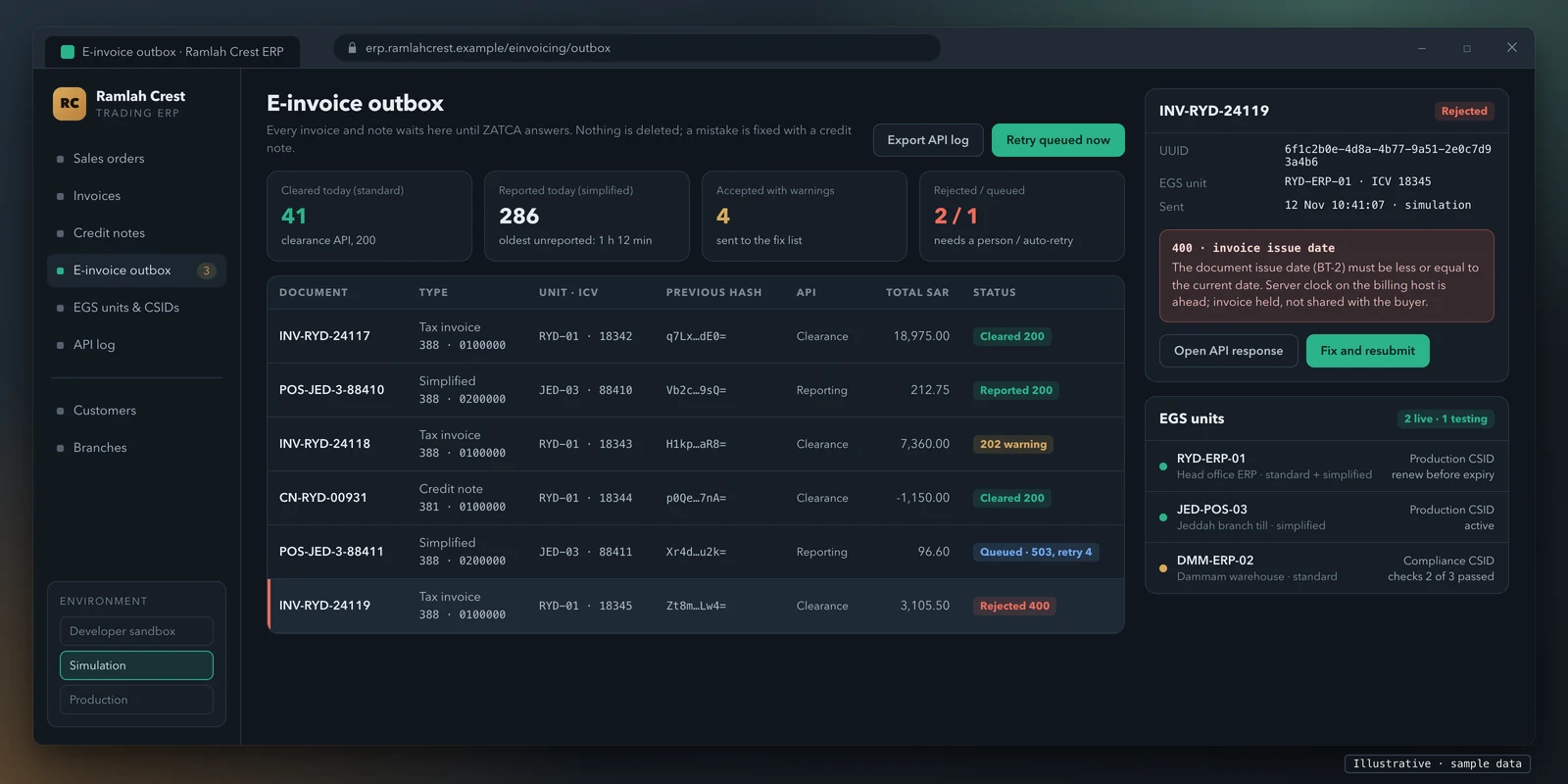
ZATCA's guideline lists the API responses and what to do with each. Your integration should act on them without a person watching:
| Response | Meaning | What the system should do |
|---|---|---|
| 200 | Accepted | Store the response (and, for clearance, the cleared XML) and release the invoice |
| 202 | Accepted with warnings | Release it, and send the warnings to a fix list; ZATCA says warnings may become rejections later |
| 303 | Clearance switched off | Submit through reporting instead, as the response says |
| 400 | Rejected | Hold the invoice, correct the data and resubmit |
| 401 | Unauthorised | Check the certificate and secret, then resubmit |
| 413 | Payload too large | Resend with a smaller payload |
| 429, 500, 503, 504 | Not received (too many requests, server error, unavailable, timed out) | Resend, with a back-off |
For outages, the guideline's failure scenarios give the pattern. If ZATCA's servers do not respond to a clearance call, its example retries for about five minutes, shares the uncleared invoice with the buyer while keeping records, then keeps trying about every 15 minutes (ZATCA marks both timings "to be confirmed") and shares the cleared invoice once clearance succeeds. Uncleared and manual invoices are treated as VAT invoices only until the compliant one is issued, and are not eligible for VAT deduction. For simplified invoices, the system keeps trying to report within the 24 hours; if your own side fails for longer, you notify ZATCA through the form on its website and again when you recover. Keep the API logs: ZATCA says taxpayers should keep evidence of trying to clear.
What that means in code: an outbox table that every invoice passes through, a queue worker with back-off, idempotent resubmission of the same signed XML, a hold state that stops a rejected standard invoice reaching the buyer, an alert when a simplified invoice nears its 24 hours, and an API log nobody can edit.
Arabic on the invoice
The guideline is direct: under Article 53 of the VAT regulations invoices must be in Arabic, and other languages may appear alongside. ZATCA's technical FAQ says every data field visible on the human-readable invoice must be in Arabic, and the invoice can be bilingual. The human-readable copy (the printout or PDF) can use Arabic or Hindi numerals, while amounts inside the XML use the digits 0 to 9. For an in-house system that prints English-only invoices, this means Arabic labels and Arabic names for products and parties, laid out right to left where the template needs it. We build Arabic and English screens and documents with right-to-left layouts.
ZATCA Phase 2 readiness: a tick-list for your system
Tick what your system already does today. Be strict: "we could add it" is not ticked.
Your ticks go into the message for you to read and edit. Nothing is sent until you press send in the form or in WhatsApp.
This runs in your browser. Nothing you tick is sent anywhere unless you choose to send it.
Build or buy: when a ready connector is the better choice
A custom integration is not always the right answer. Be honest about which case you are in.
| Your situation | Usually better | Why |
|---|---|---|
| You run a packaged ERP or POS whose vendor ships ZATCA Phase 2 support | The vendor's module | It is maintained when ZATCA changes its rules, and the vendor carries the testing |
| You are about to replace the system anyway | Move to software with ZATCA support built in | Integrating a system you are retiring is money spent twice |
| You run an in-house or heavily customised system you will keep | A custom integration | No connector exists, and the rules have to live where invoices are created |
| Several systems issue invoices (ERP, tills, a web shop) | A custom integration layer | One outbox, one queue and one log across all units |
| A middleware or e-invoicing service fits your stack | Compare it with a build | It can work if it reads your data cleanly; check who owns the keys and the logs |
ZATCA publishes a Solution Providers Directory of companies that have passed its qualification process. Its page also says taxpayers may get e-invoicing services from any company, as long as the solution meets the requirements, and that using a provider outside the directory does not make a taxpayer non-compliant. Choosing a listed provider is a reasonable filter; it is not the only route.
What we do on a ZATCA Phase 2 integration
We are a software company founded in 2020 with more than 100 projects delivered. On a ZATCA job we work on your side of the API:
- Scope. We read how your system issues invoices, list the EGS units, find the data gaps against the Data Dictionary and agree the design: XML inside your system or in a separate layer.
- Build. UBL 2.1 XML for every document type you issue, the counter, UUID and hash chain, XAdES stamping and the QR code for simplified invoices, the onboarding calls, clearance and reporting, the outbox with retries and an API log, and Arabic on your invoice templates.
- Test. Every invoice type through ZATCA's SDK and the Developer Portal sandbox, then the compliance checks and an end-to-end rehearsal in the Fatoora simulation portal.
- Go live. We support your team through production onboarding (your company requests the OTPs with its own Fatoora login; we never hold your credentials) and the first weeks of live invoices, including CSID renewal.
What we don't do: we are not in ZATCA's Solution Providers Directory and hold no ZATCA qualification, approval or certification, we give no tax advice, and the code, keys and accounts stay yours. We have no office in Saudi Arabia; we work with clients worldwide, and calls and meetings can be arranged to suit you. You get a fixed written quote after a scoping call.
Price for your integration
See the price for your integration
Tell us how your system issues invoices today and we send you a price for the ZATCA integration and a fixed written quote after a short scoping call.
- Tell us what you need
- Short scoping call
- Price and fixed written quote
Items ticked above: 0. They are in the message below, ready for you to edit.
Prefer WhatsApp? Send the same request there.
Ask for the price on WhatsAppRelated guides
- UAE e-invoicing: connecting your ERP or billing system. The UAE uses a different model: invoices go through an accredited service provider over Peppol, with no QR code.
- UAE e-invoice format: Peppol ID, PINT AE and sample XML
- Custom software development, for the systems behind your invoices.
- Custom software for UAE businesses, if you also trade in the UAE.
Sources
All opened on 12 November 2026.
- ZATCA, Wave 25 criteria for the Integration phase (news, 24 July 2026)
- ZATCA, Wave 24 criteria for the Integration phase (news, 26 September 2025)
- ZATCA, E-invoicing roll-out phases (page last updated 1 September 2026)
- ZATCA, E-invoicing guidelines: Detailed Guidelines for E-Invoicing, version 2 (May 2023); E-invoicing Detailed Technical Guidelines, version 2 (November 2022); Developer Portal user manual; Fatoora portal user manual (API endpoints)
- ZATCA, E-invoice specifications: Electronic Invoice XML Implementation Standard and Data Dictionary (19 May 2023)
- ZATCA, Security requirements: Security Features Implementation Standards (19 May 2023)
- ZATCA, Developer Portal (SDK, validator, Integration Sandbox) and Fatoora portal
- ZATCA, Solution Providers Directory
This guide explains published requirements so you can plan the work. It is not tax or legal advice, and ZATCA updates its documents: check the current versions on zatca.gov.sa before you build.