

Guide + checker · Xero and delivery paperwork
Can Xero create delivery notes? The packing slip, what it leaves out, and what wholesalers do about it
On this page11 sections
Short answer: not as a document of its own. Xero's help centre describes one thing for the job, the packing slip, and says it is also sometimes called a delivery note or delivery docket. You print it from an invoice that is awaiting payment or paid. It shows contact details, delivery address, item, description and quantity, and it hides payment and financial fields. That is enough if all your customers want is "what was in the box". It isn't if they want a signature, the quantity actually delivered, what is still to follow, or a batch number, none of which the article lists. A request for a proper one-click delivery note has sat on Xero's Product Ideas forum since April 2022 with 127 votes and the status "Submitted".
Last updated 9 November 2026. Every Xero page cited here was opened on that date.
What Xero gives you, from Xero's own pages
The table sets out what Xero Central's article on packing slips says, and then what it leaves unsaid. Where the article is silent, that doesn't prove Xero can't do something. It means Xero doesn't promise it, so test it on your own organisation before you rely on it.
| Question | What Xero Central says (opened 9 Nov 2026) |
|---|---|
| Is there a delivery note document? | The article names the packing slip, and says it is also sometimes called a delivery note or delivery docket |
| Which invoices can print one? | Awaiting payment or paid invoices. Drafts aren't mentioned |
| What does the basic slip show? | Contact details, item, description and quantity. A delivery address, and a separate billing address if one has been added |
| What does it hide? | Payment information and financial fields |
| Can the basic slip be changed? | No. The article says it can't be customised |
| Is there a custom route? | Yes. Xero offers a combined packing slip and invoice template (DOCX) that you edit, upload as a branding theme and select on the invoice. For an existing invoice you edit it and select the template. If you remove the invoice section from the template, you need a different template when you want the invoice itself |
| Signature, delivered-versus-ordered, batch or expiry fields? | Not mentioned in the article |
The custom route is worth knowing about, because it is Xero's own answer and it costs nothing. It turns the slip into a branded, laid-out document. What it can't obviously do, from what the article says, is capture a signature, store the signed copy, or print before the invoice is approved.
What Xero's users say they are missing
The request that matches most closely is One Click Delivery Notes on Xero Product Ideas. When we read it on 9 November 2026 it was marked "Submitted" with 127 votes. The original post, from April 2022, asks for bulk-printing customisable delivery notes across several invoices. Xero's community manager replied on 4 May 2022 pointing to the packing slip option and asking how much interest there was in a bulk version. The first page of comments we read shows no later reply from Xero.
These are customers asking, not Xero's plans, so treat them as a list of what the current slip doesn't do. The comments from 2026 on that first page include:
- a delivery note that can be printed from a draft invoice, so the invoice isn't approved before the goods and quantities are confirmed (3 September 2026);
- a proof of delivery with recipient name, signature, date and time, linked to the invoice (15 June 2026);
- bulk printing across invoices (29 October 2026).
Several comments on that thread also promote small third-party add-ons by their authors. We don't list or rank them here.
What a delivery note has to do that a packing slip doesn't
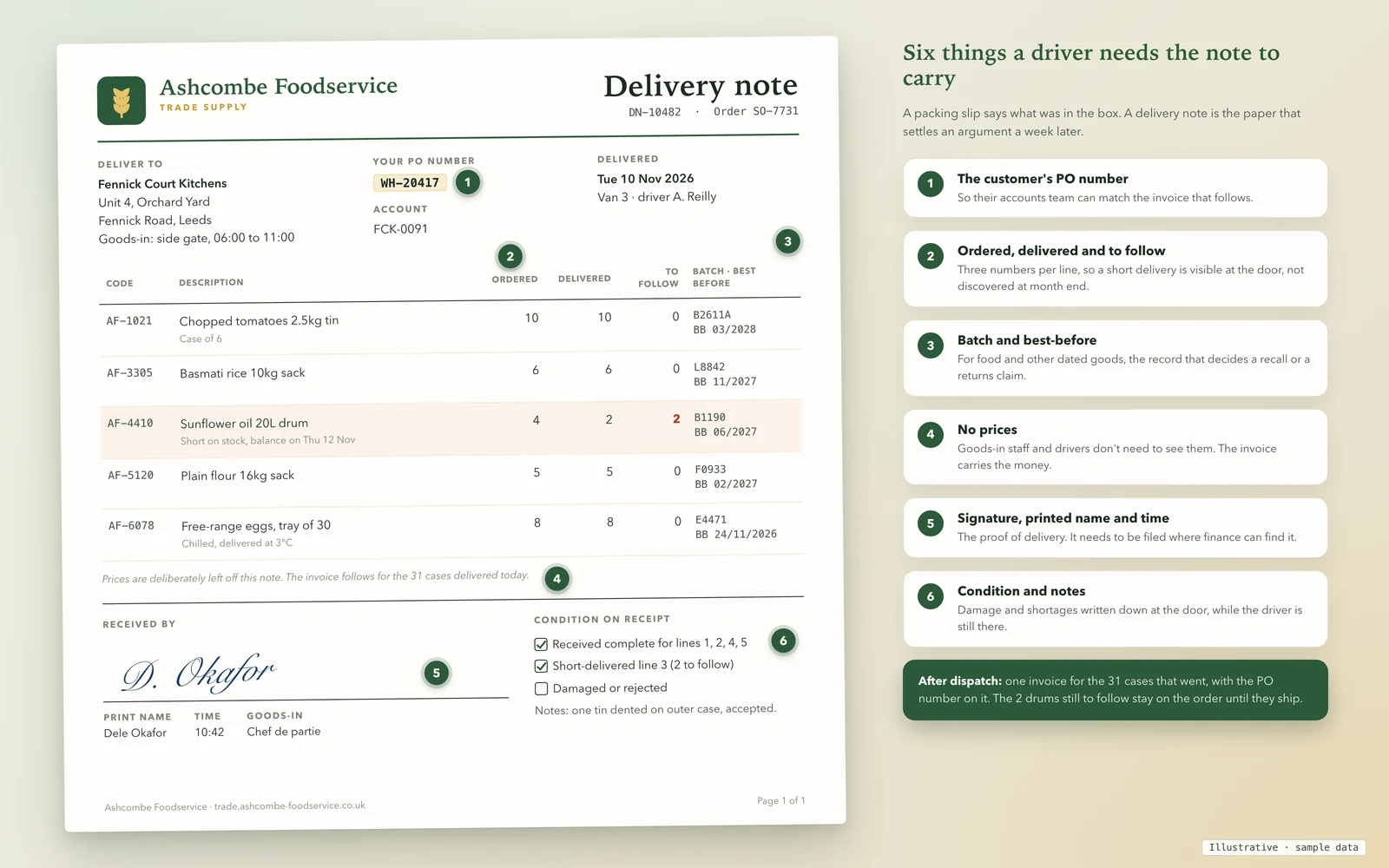
A packing slip answers "what is in the box". A delivery note answers "what did the customer receive, and who says so". Here is what we'd expect a wholesaler's note to carry, against what Xero Central's article lists.
| Field | Why the customer or driver needs it | Listed in Xero Central's slip article? |
|---|---|---|
| Delivery address for this drop | Orders go to sites, yards and branches, not always the billing address | Yes |
| Item, description, quantity | The basic record of what went | Yes |
| No prices | Drivers and goods-in staff don't need to see them | Yes (financial fields aren't displayed) |
| Customer's PO number | Their accounts team matches the invoice to it | Not listed |
| Ordered, delivered and to follow, per line | Makes a short delivery visible at the door | Not listed |
| Batch and best-before | For dated goods, decides a recall or a returns claim | Not listed |
| Signature, printed name and time | The proof of delivery | Not listed |
| Condition notes | Damage and shortages recorded while the driver is there | Not listed |
| Its own number, linked to the order and invoice | So one invoice can be matched to one drop | Not listed |
Six workarounds, compared
| Workaround | Works when | Breaks when |
|---|---|---|
| 1. The basic packing slip | Customers only want a list of what is in the box, and invoices are raised when you ship | Anyone needs a signature, delivered-versus-ordered figures, or a slip before the invoice is approved |
| 2. Xero's custom packing slip template | You want your layout, your wording and a blank signature area, one invoice at a time | You ship in parts, need to print for many orders at once, or want the signed copy filed back automatically. You also switch the branding theme per invoice |
| 3. Build the note from the invoice by hand | Low volume and a patient office. Users on the Product Ideas thread say this is what they do | It is slow, error-prone and can leak prices. It stops at about the point you add a second driver |
| 4. A spreadsheet or Word delivery note | You deliver a few drops a day and the data is already in one place | The numbers are retyped from Xero, so they drift. The signed copy ends up in a folder nobody searches |
| 5. An add-on from the Xero App Store | The add-on does exactly the job and you've tested it with three of your awkward deliveries | It doesn't know your order rules. We don't rank add-ons here: test any of them on a part shipment, a changed quantity and a signature |
| 6. An order layer that makes the note, then invoices Xero | Orders arrive from reps, a portal, email or phone, and deliveries are part shipments | It costs more than a setting change, so it's overkill if workarounds 1 and 2 already cope |
If your problem is only layout, start with workaround 2 before spending anything. If it is signatures, part shipments or disputes, you have outgrown 1 to 4.
The draft-invoice trap
Many wholesalers keep open orders as draft invoices, because a draft can be edited until the goods are picked. Xero Central says packing slips come from awaiting payment or paid invoices, so a draft can't print one. The easy fix is to approve the invoice early so the slip can print. That has two costs.
The first is the invoice itself. If quantities change at the warehouse, the customer already has an invoice for the wrong goods, and the fix is a credit note. The second is VAT. Under VAT Notice 700, section 14.2.1, the basic tax point for goods is usually the date you send them to the customer, or the customer takes them away. Section 14.2.2 says that if you issue a VAT invoice before the basic tax point, the tax point for the amount invoiced is the invoice date. So approving the invoice to unlock a packing slip can pull VAT forward for goods that haven't left. The page was last updated on 25 June 2026 when we read it. Does Xero have sales orders? goes through the same trade-off for the workarounds around orders.
The cleaner pattern is the one we describe there: the order lives somewhere that can print a delivery note, and Xero gets one invoice for the quantities that actually went.
Part shipments and backorders
On 11 September 2026 a Xero community manager wrote on the Product Ideas forum that backorders are "now fully rolled out to all customers". Xero allocates available stock immediately, assigns incoming stock to outstanding backorders, and lets you approve invoices when stock is short. That helps the accounting side of a short delivery. What Xero Central's slip article doesn't say is how a backordered quantity appears on a packing slip, so check that on your own organisation before you promise customers a "to follow" column. Our checklist below treats the to-follow quantity as something a delivery note should show, not something Xero is documented to print.
Check the delivery note you use now
Tick each thing your delivery paperwork carries today, whether it's a Xero packing slip, a custom template, a spreadsheet or something written by hand. The result shows how well it would stand up in a dispute, and the list shows the question each missing field leaves open.
The layout is all 10 items above, ready to paste into a Word or DOCX template. The CSV is the delivery-lines table for Excel or Google Sheets.
Your ticks and the missing fields go into the message for you. Add your name and email, and we reply by email with what we'd change. Nothing is sent until you press send.
This runs in your browser. Nothing you tick is sent anywhere unless you choose to send it.
Delivery notes and your records
HMRC's VAT Notice 700/21, section 2.3, lists "orders and delivery notes" among the business records for VAT-registered businesses, alongside records of dispatches of goods. The page, last updated on 18 March 2024 when we read it, does not set out what a delivery note must contain. We found no other HMRC page that does, so what goes on yours is a matter for your customers and your contracts. Whatever you produce has to be kept and retrievable, which is the real argument for filing the signed copy against the order or invoice rather than in a drawer. For how invoices and orders connect on the VAT side, see Does Xero have sales orders?. On QuickBooks instead, the same question for that product is in Does QuickBooks Online have sales orders.
If you build a delivery step in front of Xero
The rule we use is the one in the sales orders guide: the order lives in the order system, and the money lives in Xero. A delivery step in that order system produces the delivery note from the order, with ordered, delivered and to-follow quantities already worked out, the customer's PO number carried through, and a signature taken at the door. Xero then receives one sales invoice for the quantities that actually went, with the PO number and a link back to the delivery.
Check three things in anything you evaluate, ours or anyone else's:
- The note is made from the order, not retyped from an invoice. If someone keys the note by hand, the numbers will drift from the order.
- The signed copy is stored against the order and the invoice. If it isn't, you're back to a folder nobody searches.
- One invoice per dispatch. Part shipments should produce a second note and a second invoice, not a credit note and a re-issue.
For how orders reach that step, see AI order processing for emailed purchase orders and the B2B ordering portal for customers who order themselves. The fields the order itself has to collect are in the wholesale order form template, and what customers see while an order is on its way is in B2B order status portal.
What we can and can't do
We build order systems that sit in front of accounting software and connect to Xero, Sage and QuickBooks through their official APIs. You own the code and the data, with CSV export at any time. We don't start from nothing: a trade portal we built covers sales and warehousing and is used every day by a UK wholesaler. A delivery-note step with signature capture is something we would build for you, not something we are selling off the shelf.
The route is the same each time. A 20-minute walkthrough, then a fit check of your products, customers, price lists and warehouses, then set-up and import on a fixed plan and timeline, then training and close support through the first weeks. You get a fixed quote after the walkthrough, with the full cost known before work starts and run costs listed separately.
What we can't do: we can't change what Xero itself prints, we aren't a Xero partner, and we haven't tested a signature layout on your Xero organisation. If the packing slip or Xero's custom template already does what your customers ask for, we'll tell you so on the call and you won't need us.
Book a 20-minute walkthrough or send us one disputed delivery, such as a part shipment or a signature that couldn't be found. We'll show you where the delivery note would be made and what Xero would receive.
Sources
- Xero Central, Print a packing slip: packing slip, delivery note wording, invoice statuses, contents, custom template steps (accessed 9 November 2026)
- Xero Product Ideas, One Click Delivery Notes: status, votes, Xero reply of 4 May 2022 and user comments to 5 November 2026; these are customer requests, not Xero's roadmap (accessed 9 November 2026)
- Xero Product Ideas, Sales Invoices - Allow to have column for backorders: Xero's reply of 11 September 2026 on backorders being rolled out (accessed 9 November 2026)
- HMRC, VAT guide (VAT Notice 700), sections 14.2.1 and 14.2.2, page last updated 25 June 2026 (accessed 9 November 2026)
- HMRC, Record keeping (VAT Notice 700/21), section 2.3, page last updated 18 March 2024 (accessed 9 November 2026)
Last updated 9 November 2026. Xero changes features often; check the pages above on the day you decide. This guide doesn't rank or recommend Xero add-ons, and it isn't tax or legal advice.