

Guide + checker · Customer prices in Xero and QuickBooks
Xero multiple price lists and QuickBooks customer-specific pricing: what each can hold, what it can't, and what wholesalers do about it
On this page12 sections
Short answer: Xero doesn't have multiple price lists. Its help pages describe one sale price per item and a default discount percentage you can set on each customer, which Xero applies to invoice and quote lines. A request for custom (tiered) price lists has been on Xero's Product Ideas site since 2012 and is marked "Not in pipeline". QuickBooks Online has something closer, called price rules, which can be limited to chosen customers and products. Intuit calls it a beta, available to selected customers, and not in the Simple Start or Essentials plans. For a wholesaler with a few customers on a flat percentage, those settings are enough. For fixed prices per product, quantity breaks or deals with review dates, they aren't, and the price has to live somewhere else.
Last updated 9 November 2026. Every Xero and Intuit page cited here was opened on that date. Where a page doesn't say something, this guide writes "not mentioned", which is not the same as "not possible".
What each product's own pages say
The table is limited to what the vendors' own pages state, with the page and the date we read it. Plan and region are given wherever the page gives them. Where it doesn't, the cell says so.
| Question | Xero (Xero Central and Product Ideas, opened 9 Nov 2026) | QuickBooks Online (Intuit help, opened 9 Nov 2026) |
|---|---|---|
| Can an item hold more than one price? | The item page lists one "Sale price" field, in your base currency. More than one price per item is not mentioned | Price rules adjust prices by item, with a percentage and a rounding setting, on top of the item's default rate |
| Can a customer have a standing discount? | Yes. The contact page has a "Discount" field: Xero applies it to a line item on an invoice or quote, and you can override it on the transaction | Yes, through a price rule limited to chosen customers. Rules apply to all customers by default; you pick customers individually |
| Is it per product? | Not mentioned: the contact discount page describes one discount for the contact | Yes: a rule can apply to all products and services, or to chosen ones |
| Dates on a deal? | Not mentioned for the contact discount | Yes: a rule has optional start and end dates |
| What if two rules fit? | Not applicable | The default rate shows, and you pick the rule from the rate dropdown or type a rate |
| Which plan or edition? | The pages we opened do not mention plan limits. The contact page exists in a US and a non-US edition with the same discount wording | The Global help article says price rules are in beta, only selected customers can turn them on, and they aren't in Simple Start or Essentials. The US edition adds that inventory features need Plus or Advanced. The UK edition isn't stated |
| Does the vendor plan more? | A Xero community manager's reply of 13 March 2023 says no development is planned for custom or tiered price lists | Not mentioned |
Two things stand out. Xero's gap is stated by Xero itself, so it isn't a hidden setting you've missed. And QuickBooks' answer is conditional: a beta, on certain plans, where the pages we read don't confirm UK availability. Intuit's UK pricing page, which we also opened, doesn't mention price rules at all. If you are on QuickBooks in the UK, the quickest check is your own file: Settings, Account and settings, the Sales tab, Products and services. Intuit's article says that is where the "turn on price rules" switch sits.
Three kinds of customer price, because they need different tools
"Customer-specific pricing" covers three separate jobs. Which of them you have decides whether a setting is enough.
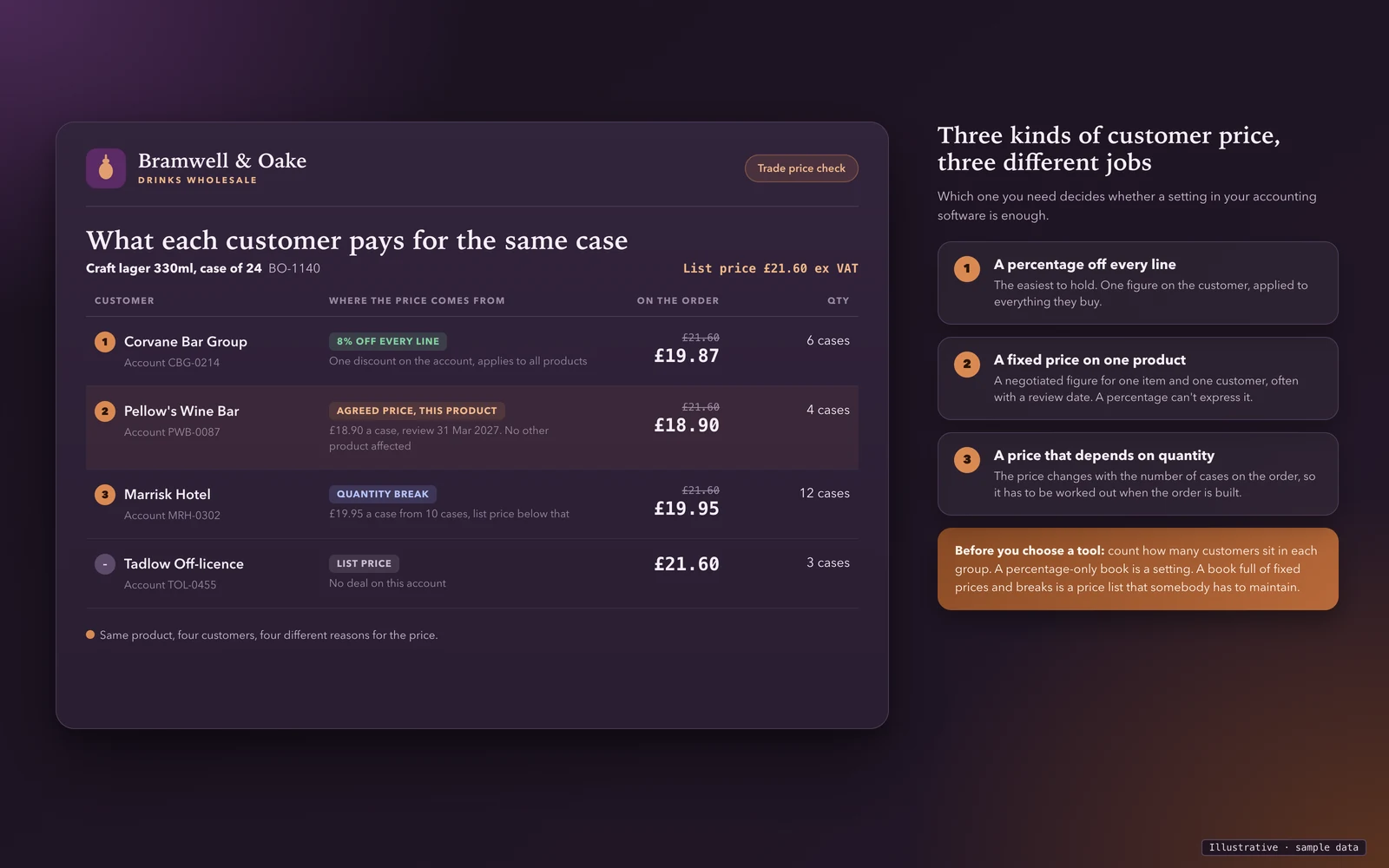
- A percentage off everything. One figure on the customer account. Xero's contact discount and a QuickBooks price rule both cover it.
- A fixed price on a product. A negotiated figure for one item and one customer, often with a review date. A percentage can't express it, because the discount would differ per product. The Xero pages we read don't offer a place to store it. In QuickBooks a price rule might, but the help page we read describes percentage adjustments and doesn't list a fixed-price option, so check the dropdowns in your own file.
- A price that depends on quantity. The price changes with the number of cases on the order. That has to be worked out when the order is built. Neither vendor's pages we opened mention quantity breaks.
Xero: what you can do today
1. Set the contact discount. Xero Central says the Discount field on a contact applies to sales: Xero applies the percentage when you add a line item to an invoice, or to a quote with your cursor in the Disc % column, and you can override it. It suits accounts that get one flat cut. It doesn't suit the customer who gets 8% off everything but a fixed price on lager.
2. Choose an invoice template with a discount column. Xero Central says a discount that has been added to an invoice always shows on the PDF, and that you can set up multiple templates with or without a discount column and apply a template to certain customers. That is about how a discount appears on the document, not how the price is worked out.
3. Copy the customer's last invoice. Xero Central's invoice page says you can create an invoice by copying and editing an existing one. For repeat customers on fixed prices, that carries the agreed prices forward. The risk is the stale price: the copy carries last quarter's rate until someone notices a price change.
4. A separate item code per customer. Some users on the Product Ideas thread describe entering the same product several times under different codes, one per price, or putting the customer's initials in the item name. Those are users' workarounds, not Xero advice. In our view they work for a handful of accounts and then cause trouble: if you track stock, one product becomes several records, and reports by item split.
5. Type the price on the invoice line. Comments on the thread describe checking the customer's last invoice and overwriting the price by hand. That is the most common real-world approach, and the main source of wrong-price invoices, which is why a checker is below.
What you can't do, from Xero's own pages: store several prices for one item and assign one to each customer. The item page lists one sale price, and Xero's reply on the request says custom or tiered price lists aren't planned. The same reply points users to inventory apps in the Xero App Store. We don't rank or recommend those here, because the right one depends on your products, warehouses and order channels. Test any of them on a fixed price, a quantity break and a price change in the middle of an order.
The request page was marked "Not in pipeline" with 135 votes when we read it, first shared in September 2012, with comments now closed. Customers are still posting: the first page we read shows posts from 2026 asking for the same thing. These are customers asking, not Xero's plans.
QuickBooks Online: what price rules do
Intuit's help article describes them this way, in the Global edition we opened and in the US one:
- You turn them on in Settings, Account and settings, Sales, Products and services.
- You create a rule in Settings, All lists, Price Rules. A rule has a name, optional start and end dates, and a customer and product scope, either everything or chosen ones.
- A price adjustment method, a percentage and a rounding setting decide how much the price goes up or down.
- On an invoice, the matching rule is applied as you add items, and you can override it by picking another rule or typing a rate. If more than one rule fits, the default rate shows and you pick.
- If you change the date or the customer on a sales transaction, the rates go back to the default and you pick the rule again.
- Recurring sales transactions keep the rate they were created with, even if the rule later expires.
- A bundle can't be added to a rule, but the items inside it can.
- Intuit says there is no limit on rules, though fewer than ten thousand works best.
Compared with Xero this is closer to what a wholesaler needs for percentage-based pricing, because it has dates and scope. What the article doesn't mention is quantity breaks, and it lists no fixed-price option. And it is a beta for selected customers, outside the two cheapest plans. For a UK wholesaler on a plan that doesn't have it, the options are the same as for Xero.
Where the price should live: a decision table
| Your customer pricing looks like | Start here | What to watch |
|---|---|---|
| A few accounts on one flat percentage | Xero contact discount, or a QuickBooks price rule on those customers | Does the percentage apply to everything they buy, including lines you'd never discount? |
| A few fixed prices, reviewed rarely | One sheet of agreed prices, the customer's last invoice copied, price typed on the line | Review dates, and who checks the line against the sheet |
| Dozens of accounts with their own prices | A price list held outside the accounting software, applied when the order is built | Every order passing through one place, not through someone's memory |
| Quantity breaks | A price list with break columns, as in our price list template | Showing the net price at each break, so it can be checked against an invoice |
| Customers who should see only their own prices | A B2B ordering portal, where each account sees its own price list | Whether prices come from the same list your office quotes from |
| Orders by email, phone or from reps | AI order processing or a rep order form that prices each line from the customer's list | Whether the extracted line is matched to the agreed price or the list price |
Four ways to run customer prices without waiting for Xero
A spreadsheet price list per customer. One workbook, a tab per customer or band, with the columns from the wholesale price list template plus the rule, agreed price, break quantity, start date, review date and who agreed it. It's free and it works while one person owns it. It stops working when a second person quotes from an old copy.
An order form that shows the customer's price. If customers order from a form you send, put their agreed price on it, per line, so the order arrives priced. The fields an order form needs are in the wholesale order form template. The weakness is the same as the sheet: someone has to keep each customer's form current.
A price per account, applied when the order is built. The order system holds each account's price list and works out the price when the line is added, then sends Xero or QuickBooks one invoice with the price already agreed. That is the pattern in does Xero have sales orders, and the delivery paperwork follows the same logic in can Xero create delivery notes. On QuickBooks, the matching guide is does QuickBooks Online have sales orders.
An add-on from the app store. Test it before you rely on it: ask it to hold a fixed price, a quantity break and an agreed review date, and check what lands in your accounting software.
Check how fragile your customer pricing is
Tick every statement that is true for your business today. The result shows whether a setting is likely to hold your prices or whether they need a price list, and ends with the first question we'd ask you.
Tab-separated, so it pastes straight into Excel or Google Sheets. It holds the columns that settle a price dispute.
Your ticks go into the message for you. Add your name and email, and we reply by email with what we'd set up. Nothing is sent until you press send.
This runs in your browser. Nothing you tick is sent anywhere unless you choose to send it.
Discounts and the VAT invoice
However a customer's price is held, the invoice has to show it properly. GOV.UK's page on VAT on discounts and gifts says that for a basic discount, such as 20% off, you charge VAT on the discounted price. HMRC's VAT guide (Notice 700), section 7.3.2, says the same for an unconditional discount, and sets different rules for a prompt-payment discount and a contingent one, where the customer must do something later. A standing percentage on a customer's account is the first kind, but check which one your deal really is. HMRC's VAT Notice 700/21, section 4.1, lists the unit price and the rate of any cash discount among the details a VAT invoice must show. So the price on each line should be the agreed price, not a figure someone worked back to. Your own accountant should confirm how your particular deals are treated; this isn't tax advice.
Why wrong prices are expensive
A wrong price on a customer's invoice costs more than the difference. Someone raises a query, a credit note is issued and a replacement invoice goes out, and the customer's accounts team lose confidence in the next one. Customers with their own fixed prices notice quickly, because they agreed the figure. The cheapest protection is boring: one list of agreed prices with dates, a rule that nobody types a price that isn't in it, and a check on the first invoice after any price change. Our wholesale price list template covers versioning, so you can show which list was in force on the date of an order. If part of the problem is minimum order quantities, the MOQ policy template settles those rules.
How we'd approach customer prices in front of Xero or QuickBooks
The rule we use is the one in the sales orders guide: the order lives in the order system, and the money lives in your accounting software. The order system holds each account's price list: fixed prices, breaks and dates. It works out the price when a line is added, whether the order comes from a rep, a portal or an emailed purchase order, and then sends Xero or QuickBooks one invoice with the price already settled. Check three things in anything you evaluate, ours or anyone else's:
- The price comes from a list, not from a person. If someone keys it, it will drift.
- A change of price has a date. An order from last month keeps last month's price.
- The invoice that reaches the accounts matches the order line. Nobody should have to compare them by hand.
For how orders reach that step, see AI order processing for emailed purchase orders and the B2B ordering portal for customers who order themselves, with each account seeing its own prices. The cost sums are in B2B ordering portal cost.
What we can and can't do
We build order systems that sit in front of accounting software and connect to Xero, Sage and QuickBooks through their official APIs. You own the code and the data, with CSV export at any time. We don't start from nothing: a trade portal we built covers sales and warehousing and is used every day by a UK wholesaler. Per-account price lists with quantity breaks and dates are something we would build for you, not something we are selling off the shelf.
The route is the same each time. A 20-minute walkthrough, then a fit check of your products, customers, price lists and warehouses, then set-up and import on a fixed plan and timeline, then training and close support through the first weeks. You get a fixed quote after the walkthrough, with the full cost known before work starts and run costs listed separately.
What we can't do: we can't add price lists to Xero or QuickBooks themselves, we aren't a Xero partner, and we haven't tested price rules on your QuickBooks file. If a contact discount, or a price rule where you have it, already does what your customers need, we'll tell you so on the call and you won't need us.
Book a 20-minute walkthrough or send us your three awkward prices: a fixed price, a quantity break and a deal with a review date. We'll show you where each would be held and what your accounting software would receive.
Sources
- Xero Central, Contact fields: the Discount field on a contact, how it applies to invoice and quote lines, override, region edition with UK spelling; US edition Contact fields has the same discount wording (both accessed 9 November 2026)
- Xero Central, Add an inventory item: item fields, including the single Sale price (accessed 9 November 2026)
- Xero Central, Show discounts on your invoices and other documents: discount column, multiple invoice templates (accessed 9 November 2026)
- Xero Central, Create an invoice for your customer: copy an existing invoice (accessed 9 November 2026)
- Xero Product Ideas, Product & services - Create custom (tiered) price lists for contacts: status "Not in pipeline", 135 votes, first shared 6 September 2012, Xero's reply of 13 March 2023, user comments to 29 October 2026; these are customer requests and workarounds, not Xero advice or roadmap (accessed 9 November 2026)
- Intuit, Set price rules in QuickBooks Online (Global edition): setup steps, scope, dates, overrides, recurring transactions, beta wording, plan exclusions (accessed 9 November 2026)
- Intuit, Set price rules in QuickBooks Online (US edition): adds that inventory features are available for QuickBooks Online Plus and Advanced (accessed 9 November 2026)
- Intuit, QuickBooks UK pricing: opened to check UK plans; price rules and price lists are not mentioned on the page (accessed 9 November 2026)
- GOV.UK, VAT on discounts and gifts: basic discounts, VAT charged on the discounted price (accessed 9 November 2026; the page shows no update date)
- HMRC, VAT guide (Notice 700), section 7.3.2 discounts, page last updated 25 June 2026 (accessed 9 November 2026)
- HMRC, Record keeping (VAT Notice 700/21), section 4.1 details on a VAT invoice, page last updated 18 March 2024 (accessed 9 November 2026)
Last updated 9 November 2026. Xero and Intuit change features and plans often; check the pages above on the day you decide. This guide doesn't rank or recommend add-ons, and it isn't tax or legal advice.